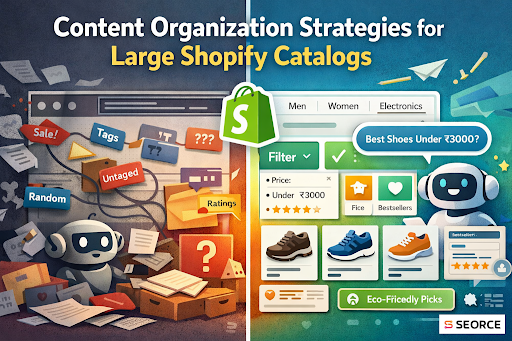
Managing a large Shopify catalog can get overwhelming real fast. One day you're adding a few new SKUs, and the next, you're buried under thousands of products that all need to be searchable, scannable, and shoppable.
Ever found yourself scrolling through your own site and thinking, “Wait… even I can’t find this product easily”? That’s not just a small UX issue. It’s a conversion killer.
Your customers don’t have the time (or patience) to dig through messy menus, inconsistent tags, or scattered collections. They want clarity, speed, and relevance. And honestly, you should too, because clean, well-structured content isn’t just helpful for users, it’s great for SEO, internal workflows, and scaling efficiently.
Take a fashion store selling thousands of SKUs. If jackets are listed under both Winterwear and Outerwear, without proper filtering or tagging, you’re creating a dead end for shoppers and a headache for search engines.
That’s where smart content organization strategies come in. They don’t just make your store look good; they make it work better.
In this guide, I’ll walk you through some amazing strategies to organize your Shopify catalog in a way that feels effortless for both your team and your customers.
Why Content Organization Matters for Large Catalogs?
If you’re managing a large Shopify store, how you structure your catalog isn't just about neatness. It directly affects how customers find products, how search engines understand your site, and how easily you can scale.
When your product catalog is poorly organized, shoppers struggle to browse. Pages take longer to navigate, filters don’t help, and relevant items are buried. That creates friction, and friction kills conversions.
A clear catalog structure (also called product taxonomy) gives your store a logical flow. It groups related products into intuitive categories and subcategories, applies consistent tags, and supports useful filtering options.
This helps:
- Customers find products faster and stay longer
- Search engines crawl and index your pages more accurately
- Your team make updates without breaking the structure
More importantly, a structured catalog improves internal linking, enhances site speed, and strengthens semantic relevance. These factors together boost your ranking not just in traditional search but also in AI-powered shopping assistants and generative engine results.
And here’s the kicker: platforms like Shopify don’t do this for you. You have to intentionally design your content layout, from categories and collections to filters and tags, based on how your shoppers think and search.
A clean product taxonomy makes your store easier to explore, your content easier to generate, and your site easier to scale.
So now that you know why this matters, let’s jump straight into the strategies to organize your Shopify catalog like a pro.
How to Organize Large Shopify Catalogs for Maximum Clarity and Visibility
When you’re managing hundreds (or thousands) of products on Shopify, things can get overwhelming fast.
But here’s the good news: organizing your content the right way doesn’t just help customers, it also helps AI understand your store better. And that means higher visibility, smarter recommendations, and more conversions.
Let’s walk through the key strategies
1. Start With a Clean Product Taxonomy
If your catalog isn’t organized properly, your entire store (and search visibility) will suffer.
Think of your product taxonomy as the foundation of your Shopify store. If it's messy, not even the best SEO, content, or ads can save you. But when it's clean and structured, you’re setting up your catalog to be understood by both users and AI engines.
Start with the basics.
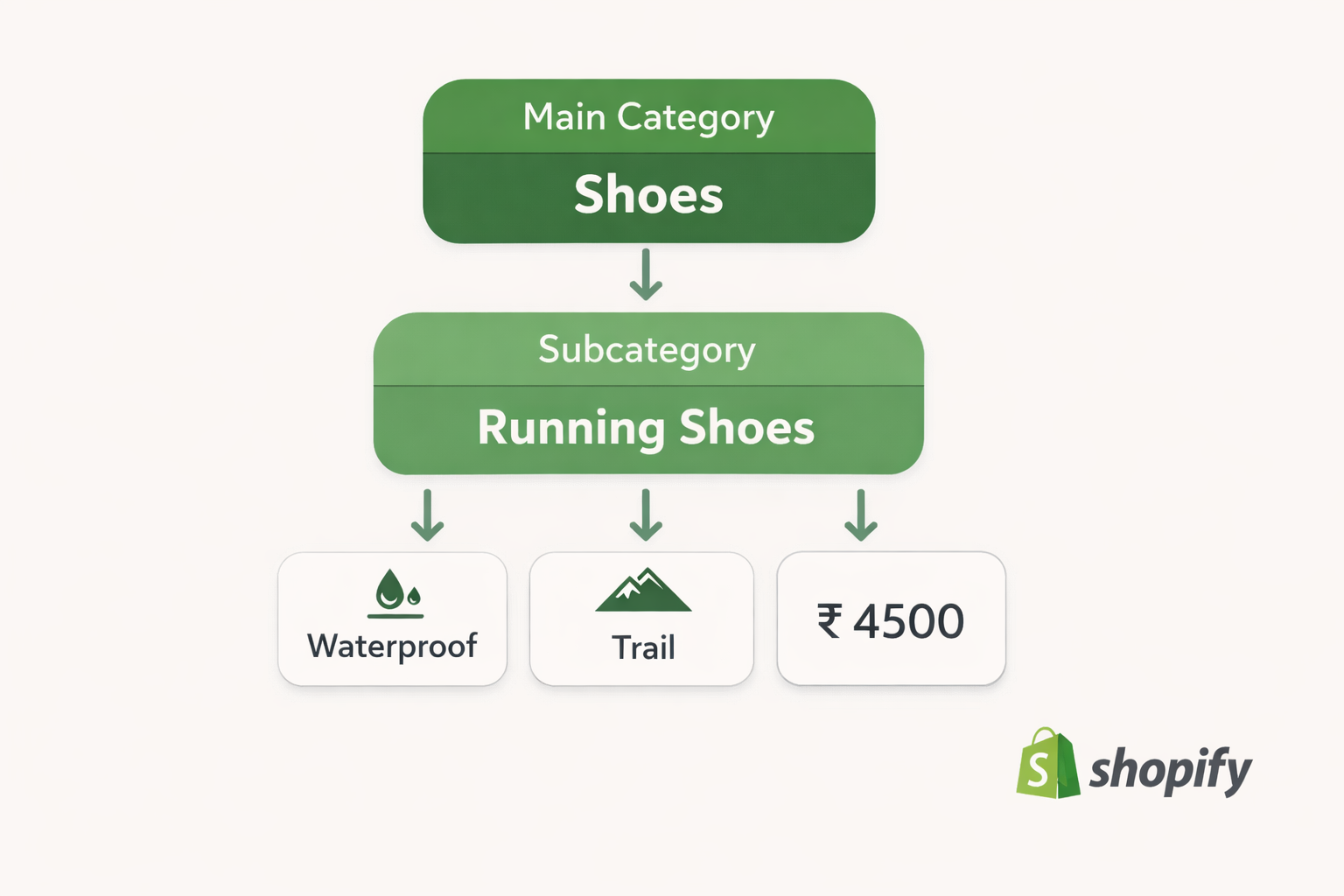
Every product should fit into a logical hierarchy:
- Main categories (like jackets, shoes, skincare)
- Subcategories (like winter jackets, trail shoes, face serums)
- And below that, specific product types and traits (like waterproof, anti-aging, etc.)
You’re not just labeling stuff here. You’re teaching AI what your store is about.
Here’s a quick visual to show what a clean product taxonomy actually looks like:
Why does this matter?
Because when someone searches for “waterproof trail shoes under ₹5000,” AI models pull context from your catalog structure. If your taxonomy is clear, your products show up. If it’s vague or chaotic, they disappear into the void.
The goal here is that every product should live where it makes the most sense. No overlaps, no duplicates, and definitely no random catch-all buckets like “miscellaneous” or “new stuff.”
That also means you should avoid creating too many categories. Having more doesn’t always help. What truly matters is clarity.
Keep it human. Would you find that item in 5 seconds? If not, clean it up.
Once your structure is set, everything else becomes easier. This includes collections, filters, and even automated merchandising.
So don’t treat taxonomy as a backend chore. It’s your blueprint for visibility, trust, and conversion in an AI-powered search world.
2. Leverage Shopify Collections Strategically
If you’re dealing with a large product catalog, Shopify collections are your shortcut to sanity.
Instead of manually managing every single product page, collections help you group items together so customers can find what they’re looking for faster, and AI engines can better understand your store’s structure.
There are two types of collections:
- Manual collections: You handpick what goes in.
- Automated collections: You set the rules (like product tag, vendor, or price), and Shopify fills it in for you.
For larger catalogs, automated collections are a lifesaver. You don’t have to update them every time new stock is added. They update themselves based on your conditions.
Here’s how you should use collections smartly:
Create collections around real shopping intent, things like New Arrivals, Best Sellers, Under ₹1000, or Summer Essentials. You can also group by product benefits (like Waterproof Gear) or customer goals (like Gifts for Runners).
That way, both your customers and AI systems can make sense of what you're offering quickly and clearly.
Also, don’t just create collections and forget them.
Add clear titles, short intros, and link them across your site. This gives structure, improves crawlability, and helps generative engines connect the dots.
Done right, collections turn your Shopify store from a giant list of products into a guided experience that serves both humans and performs well in the AI search era.
3. Use Tags & Meta Fields to Add Signal
If you want your store to feel smarter you need to use tags and meta fields properly.
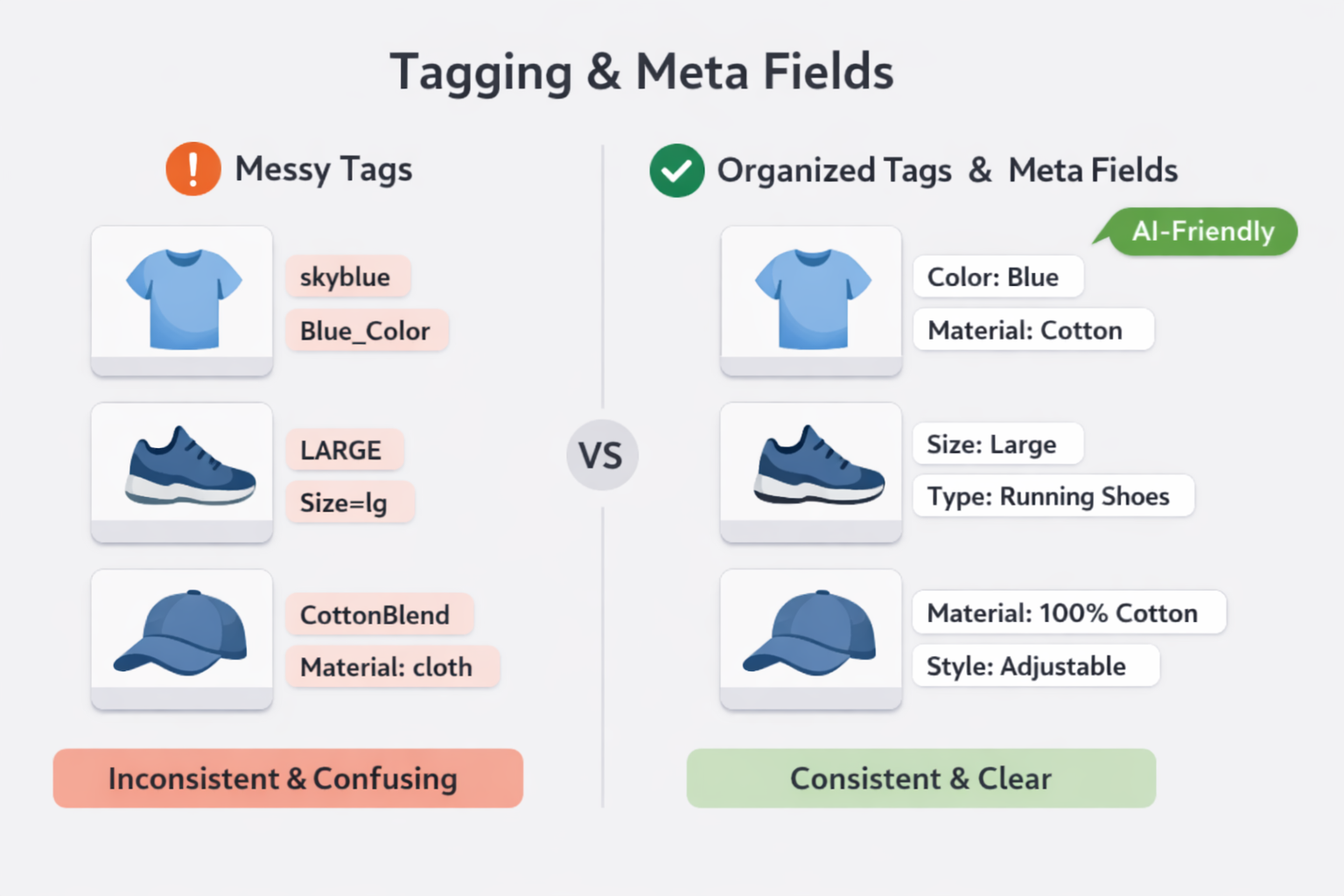
Tags are like little labels that help you sort and filter your products. They're useful for things like color, size, or collection themes. But the key is to be consistent. Don't use “Blue” on one product, “blue-color” on another, and “skyblue” on the third. That just confuses everyone, especially AI.
When you tag products the same way every time, Shopify collections stay clean, filters work better, and your site becomes easier to navigate.
Here’s a quick visual to show how messy vs organized tagging looks in action:
Now, let’s talk about meta fields.
Meta fields are where you store structured information about a product, things like fabric type, warranty details, or fit recommendations. This data isn't just helpful for customers, it's also valuable context for search engines and generative AI tools.
For example, if someone asks an AI, “What’s a good lightweight jacket for hiking?”, that engine pulls from structured signals like your product’s weight, material, and use case, things you can store in meta fields.
So, while tags help with sorting and automation, meta fields add depth and clarity.
Use both wisely.
Keep tag systems tight and clean, and fill out meta fields thoughtfully, not just for backend convenience, but to give AI the confidence to recommend your products in search.
4. Optimize Descriptions for Context, Not Just Keywords
Gone are the days when stuffing your product descriptions with keywords was enough. Now, if you want your products to show up in AI-generated answers and smart search, you need to focus on clarity, context, and natural language.
The important thing to remember is you’re not just listing features, you’re showing how the product fits into someone’s need or intent.
Write like you’re talking to a customer who’s unsure, curious, or comparing options. Use simple words and give just enough detail to paint a clear picture.
Let’s look at an example.
Instead of this:
“Blue cotton T-shirt, 100% organic, round neck, breathable fabric, best cotton t-shirt, organic t-shirt, soft cotton shirt.” |
Try this:
“This lightweight, 100% organic cotton T-shirt is made for warm days and easy layering. With a relaxed round neck and breathable weave, it’s perfect for everything from daily errands to casual hangouts. And yes, it’s just as soft as it looks.” |
See the difference? The first one is keyword-heavy but robotic. The second one is conversational, intent-friendly, and gives helpful context.
That’s what AI engines want today: descriptions that actually answer shopper questions like:
- “Is this shirt breathable for summer?”
- “Will it look good for a casual outing?”
- “Is it eco-friendly and soft?”
So write like you're solving a mini problem for the buyer. Add details that explain the who, why, and how, not just the what.
When your descriptions feel natural, helpful, and confident, you're doing more than just selling. You're creating trust with both your customer and the AI trying to serve them.
And that’s how your product gets recommended, even when people aren’t searching with exact keywords.
5. Build Internal Navigation With Purpose
Internal navigation isn’t just about helping users click around. It’s about guiding both people and AI through your store with intention.
When your internal links are clear and structured, it becomes easier for customers to explore related products. But more importantly, AI engines use those links to understand how your site is connected. They look at which pages matter and what topics relate to each other.
Let’s say you sell running shoes. If your Running Shoes collection links to Trail Shoes, Socks, and Water Bottles, you’re telling both users and AI: “These items go together. Show them together.”
This kind of thoughtful linking improves discoverability. It also helps AI recommend your products in response to more complex or contextual queries.
Here’s a simple example of smart internal linking:
On your Trail Shoes product page, add a short section: “Looking for gear to go with your new shoes? Check out our hydration packs, lightweight jackets, and anti-blister socks.”
Now you’re doing two things at once:
- Improving the user journey by suggesting useful items.
- Sending strong signals to AI about product relationships and categories.
Also, avoid dead ends.
Make sure every important collection, product, or content page is linked from somewhere logical like the homepage, menu, or another related page. If a page feels isolated, it likely won’t get indexed properly or surfaced in AI responses.
So when you build internal navigation, don’t do it randomly.
6. Automate Where You Can (But Audit Regularly)
Managing a large Shopify catalog manually is just not scalable. That’s why you need to automate wherever possible. But automation only works well if you keep an eye on it.
Let’s start with what to automate.
Use Shopify’s built-in rules to auto-assign products to collections based on tags, vendors, or price ranges. Shopify's built-in feature for auto-assigning products to collections uses something called Automated Collections.
So, how to set up smart collections?
- Go to Shopify Admin > Products > Collections.
- Click Create Collection.
- Enter a Title and Description (optional but helpful).
- Under Collection type, select Automated.
- Set conditions based on product tags, type, vendor, price, etc.
You can also use bulk editors to update meta fields, inventory, or even pricing across multiple products in one go.
This saves you hours of repetitive work and helps your store stay up-to-date without constant handholding.
But don’t fall into the trap of "set it and forget it."
Over time, things change. Tags drift. Products shift. Old rules might start pulling in the wrong items, or new products don’t get picked up at all.
That’s why regular audits matter.
Every few weeks, review your automated collections, tag logic, and any rules you’ve set. Check if products are being excluded when they shouldn’t be or included when they don’t belong.
Also, revisit your filters and navigation. Are they still aligned with how customers search today? Are your automation rules still relevant for new product lines?
Automation is there to make your job easier, not invisible.
So build smart rules, but always stay in the loop. That way, you get the best of both worlds: efficiency and accuracy. And for AI-first search, that’s a winning combination.
7. Think Beyond Pages — Think Structured Signals
When you're organizing your Shopify store, it's easy to focus only on the visual aspects like how the pages look, how the menus flow, or how fast things load.
But for AI-powered search engines, what matters just as much (if not more) is what’s under the hood, the structured signals.
So what are these signals?
They’re the bits of information that aren’t always visible to shoppers but are read by AI models and search engines to understand your products better. Think of things like:
- Product schema markup
- Availability (in stock / out of stock)
- Price, color, size, and material as separate data fields
- Customer reviews, star ratings, and FAQs
- Meta fields with specific product attributes
These aren’t “extras.” They are core ingredients for how AI answers are generated.
If someone asks a chatbot, “What’s a budget-friendly moisturizer for dry skin under ₹500?”, an engine won’t crawl every page and read your descriptions like a human.
Instead, it pulls from structured signals like product type, use case, price, and skin type compatibility, if you’ve clearly labeled and organized them.
So, your goal isn’t just to write a good page.
It’s to communicate your product’s traits in a format that AI can instantly read and trust.
That means properly using meta fields, enabling review sections, and filling in all the backend details without leaving them blank or generic.
The more structured your signals are, the better your products rank, get recommended, and show up in AI-driven shopping journeys.
8. Tie Your Product Content Into Broader Intent
Your product pages shouldn’t exist in isolation. If you want to show up in AI-generated answers, you need to align your content with what people are really looking for, not just what you’re selling.
That’s where broader search intent comes in.
Think about how people search now. They don’t just type product names. They ask for advice, comparisons, and solutions. Things like:
“Best gifts for skincare lovers under ₹1000” or “What to wear for a winter trek?”
If your product content connects with those types of queries, you’re not just listing items, you’re answering intent.
How do you do that?
Create content that surrounds your products. Add blogs, FAQs, guides, and collection intros that answer common questions and naturally link to relevant products or categories.
For example, a blog post on “How to build a basic winter layering kit” can link to your thermals, jackets, and gloves. That way, you’re giving value and leading shoppers to the right items, all while feeding search engines strong, connected signals.
Also, make sure your internal links are clear. Help both humans and AI move from intent-driven content to purchase-ready pages.
So instead of only thinking, “How do I describe this product?” ask: “Where does this product fit into the customer’s journey, and how can I support that journey with content?”
Final Thoughts
So, if you're working with a big Shopify catalog, don’t just organize it for humans. Structure it for AI too. The way you name collections, use tags, and write product content directly shapes how AI tools see and recommend your products.
Think about it, when someone asks a chatbot for “best budget skincare,” will your product come up? If you’ve followed these steps, you’ve already improved your chances.
Keep things clear, connected, and intent-focused. Build for discovery, not just display.
And remember: this isn’t a one-time setup. Your catalog is a living system. Check it, tweak it, grow it.
That’s how you turn a large product list into a high-performing, AI-optimized shopping experience.
Frequently Asked Questions (FAQs)
1. How can I improve search visibility for a large Shopify catalog?
Focus on descriptive titles, clear meta descriptions, and optimized collection pages so search engines and AI tools can easily understand your products. Structure your site with internal links and quality content for better AI indexing.
2. Should I use tags or collections first?
Use a logical collection structure to group products, then enhance discoverability with consistent tags for attributes like color, material, or style. This helps both customers and AI understand product relationships.
3. How often should I update my catalog content?
Regular updates keep your catalog fresh and relevant. Check product descriptions, tags, and collections periodically so AI and search engines see accurate, up‑to‑date information.
4. Can automated collections help?
Yes. Automated collections save time by grouping products based on criteria like tags or price, helping you scale without manual reorganization for every new product.
5. Do product page details matter for AI‑first SEO?
Absolutely. Helpful descriptions, structured attributes, and clear URLs signal relevance to search and generative engines, improving chances of your products being recommended.