Why is Product Rankings so Important?
Product ranking decides the order in which products appear on search results, recommendation sections, or product lists. The most relevant products for a search appear at the top, while less relevant ones are ranked lower to help customers find what they need faster.
The ranking system checks product details, compares them with search keywords, picks the best matches, and then arranges them based on relevance.
Just like people don’t scroll through many pages on Google, most shoppers don’t go past the first page of product listings. In fact, 89% of buyers only check the first page. If they don’t find what they need, they leave.
That’s why improving how products are ranked in search results is as important as ranking well on Google. It directly impacts sales and customer satisfaction.
Now, let’s discuss how to manage e-commerce product rankings through effective e-commerce SEO techniques.
Best Practices to Manage E-commerce Product Rankings
Want to get your e-commerce products ranking higher? It’s all about smart SEO. When your store shows up at the top, more people find your products, and that means more sales.
But it’s not just about stuffing in keywords—there’s a strategy to it. From optimizing product descriptions to improving site speed, every little detail matters.
If you’re serious about boosting visibility and getting ahead of the competition, here’s a step-by-step guide to help you make it happen.
1. Conduct Comprehensive Keyword Research
If there’s one thing every online store owner needs to do, it’s solid keyword research. Finding the right keywords makes all the difference in getting your products in front of the right people.
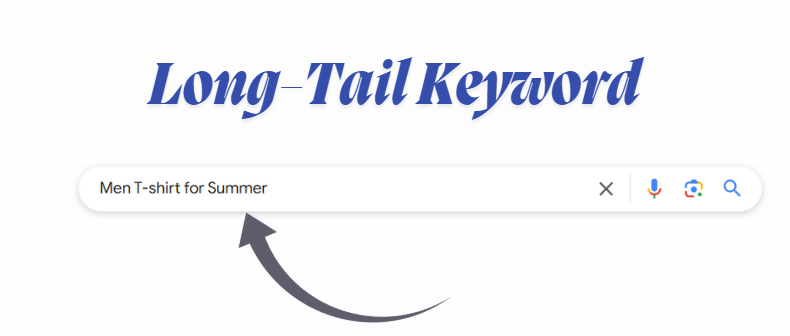
Think about it—shoppers type in specific phrases when looking for products, and if your store matches those searches, you’re more likely to show up. Let’s say you sell Men t-shirts.
Instead of just using generic terms like “Men t-shirt,” you dig deeper and find that tons of people search for “Men T-shirt for Summer.”

This is what is called Long-tail keywords. Adding such keywords to your product descriptions and titles helps attract the exact customers who need what you’re selling.
That’s how you boost traffic and get more sales.
In order to conduct keyword research, there are a few ways for that. Let’s dive into this.
Jaggery Consulting's Keyword Planner:
Jaggery Consulting’s Keyword Planner is a smart SEO tool that helps businesses get noticed online and pull in more organic traffic. It digs deep into keyword research, showing users which terms matter most in their industry.
With machine learning in the mix, it reveals how tough the competition is and where the best SEO opportunities lie.
This platform takes SEO seriously, blending hard data with advanced analytics to deliver insights that actually make a difference. Businesses can fine-tune their strategies, draw in the right audience, and build a strong online presence that lasts.
Google Keyword Planner:
Google Keyword Planner is a free tool inside Google Ads that helps you find the right keywords for your ads and content.
Just type in words or phrases related to your business, and it’ll suggest keywords along with data like search volume, competition, and estimated ad costs.

This info gives you a solid idea of what people are searching for and how tough it is to rank for those terms.
To use it, you’ll need a Google Ads account. Once you're in, head over to "Tools & Settings" and click on "Keyword Planner" under "Planning." From there, you can either type in keywords or enter your website URL to get customized suggestions.
You can also check out past trends and future forecasts, making it easier to plan your marketing strategy.
Utilizing Google Autocomplete Predictions:
Google Autocomplete makes searching way easier by guessing what you're typing before you even finish. You’ve probably noticed this when you start typing in Google, and a list of suggestions pops up. These aren’t random—they’re based on what’s popular and what people are searching for the most. And if you're in e-commerce, this is gold for keyword research.
Paying attention to these predictions helps you figure out what potential customers are looking for. Let’s say you sell fitness gear. If you type “Best Smartphones” and see suggestions like “best smartphones under 15000” or “best smartphones under 20000,” those are keywords people actually use.

Adding them to your product descriptions, titles, and content can boost your visibility and get your products in front of the right audience.
Want to get the most out of Google Autocomplete? Try these strategies:
- Go Incognito: Open a private browsing window so your past searches don’t mess with the suggestions. This gives you a more accurate picture of what others see.
- Use the A-Z Trick: Type your keyword followed by different letters of the alphabet. If you're searching for “best smartphones,” try “best smartphones a,” “best smartphones b,” and so on. This helps you discover hidden keyword ideas.
- Switch Up the Order: Change the word order and use both singular and plural forms. “best smartphone” and “best smartphones” might bring up completely different results.
Using these tactics, you can build a solid list of keywords that match real search behavior. More visibility means better rankings, and better rankings mean more potential customers.
2. Optimize Product Names and Titles for Better Search Visibility
Make sure your product names and page titles match what people are actually searching for.
Your H1 tag is the big, bold heading on your page—it tells both customers and search engines what your product is about.
If you use the right words and phrases that shoppers type in, your page becomes more relevant. And guess what? That means better chances of showing up higher in search results.
So, if you want to tweak your product names and titles the right way, start by doing solid keyword research as mentioned earlier. Find out exactly what words and phrases people use when searching for products like yours.
Also, make sure your H1 tags and title tags match up. Your title tag shows up in search results and on the browser tab, while your H1 tag is what people see on the actual page.

Keeping them consistent helps search engines understand your page better and reassures visitors they’re in the right place.
As shown in the image above, if your title tag says "Buy Canon EOS 3000D," your H1 should be something like "Canon EOS 3000D" This keeps things clear and makes for a better user experience.
3. Add Unique and Helpful Product Content
Manufacturer descriptions give you a good starting point for your store. But as a retailer, you can add more value than just what the manufacturer provides.
You can help customers by giving recommendations or comparisons to make their buying decisions easier.
There are many ways to make your product pages more helpful. Here are some examples.
Add FAQs (Frequently Asked Questions):
Adding an FAQ section to your e-commerce product pages is a game-changer. It helps shoppers get quick answers without having to dig around or reach out to customer support. When people find the info they need right away, they’re more likely to trust your brand and complete their purchase.
On top of that, FAQs can boost your site’s SEO. If you include common search terms in your questions and answers, your product pages have a better shot at showing up in search results.
Plus, using structured data can make your FAQs stand out on Google, which could mean more clicks and more customers.
Add a Short Review:
Adding short, personalized reviews on your product pages can really help build trust with customers and boost sales. These little reviews give potential buyers a quick, honest look at the product’s key features, so they can make better choices.
Seeing real feedback from others can answer questions they might have and reduce any doubts, which could lead to more people buying.

Reviews also help your site’s SEO. They show search engines that your site is active and up-to-date, which might help improve your search ranking.
On top of that, reviews often use words that customers are likely to search for, making it easier for people to find your page.
Add a Q&A Section:
Having a Q&A section on your product pages is a great way for customers to ask questions and get answers. It helps clear up any confusion right away and makes your product page more useful, which can even help with SEO.
By answering specific questions, you're giving buyers the info they need to make a decision and feel good about it.
When you keep your Q&A section active, it shows you're listening to your customers and care about being open with them. This builds trust and makes customers more likely to stick around.
Add Creative, Helpful Content:
Improving your e-commerce product pages with fun and helpful content not only makes shopping more enjoyable for your customers but also gets them to engage more and maybe even buy more.
One of the major things is to add comparison charts just like Amazon does.

Make simple comparison charts that let shoppers see how different products stack up against each other. This is super helpful for tech items like phones or headphones.
You can even add cool filters or side-by-side views so it’s easier to compare.
There are other features you can add on, for example:
- Product Guides: Create easy-to-read guides that tell people everything they need to know about your products. This could be how to use them, how to take care of them, or even how to style them. For example, if you're selling clothes, show how to wear a piece for different events. These guides help customers feel more confident about their purchase.
- Videos and Augmented Reality (AR): Show off your products with videos. This can be unboxings, how-to guides, or just showcasing what makes your product awesome. A beauty brand could even show how to use their makeup in a video. You could also add AR so people can try things virtually, like seeing how a couch looks in their living room or how glasses fit their face.
- Personalized Recommendations: Give your customers suggestions based on what they’ve looked at or bought before. If they’ve checked out a jacket, maybe recommend a matching hat. It’s an easy way to increase sales without being too pushy.
4. Optimize Product Images
To make your product pages better, use awesome photos or videos that show your product from all angles. This not only helps your page rank higher but also attracts traffic from Google Images.
When you optimize your images right, your page loads faster, SEO gets better, and your customers enjoy shopping more.
For example, If someone types "stainless steel water bottle" in Google Images, Google will show pictures that come from product pages that are really well done. For example, while searching the keyword we got these results on the top:

These pages have clear, sharp images with helpful names and text.
If you make sure your images are optimized, one of them might pop up in the search results, and people will be able to click on it and visit your website directly.
Here’s how to make sure your product images are optimized well:
Use High-Quality Images:
Good product photos are super important for online shopping. They can really help people decide whether or not to buy something. Clear, bright pictures let shoppers see the details of a product and get a good idea of what it looks like, which is key since they can't touch it. A study even found that 67% of people say good pictures are a big deal when making a purchase.
Great photos also make the shopping experience more enjoyable. When a website looks professional, people feel more confident about buying, and they’re more likely to stick around and browse.
Plus, high-quality images can help the website load faster and show up higher in search results, bringing in more visitors.
So, getting great photos is not just about looking good—it can help boost sales and keep customers coming back.
Use Descriptive File Names:
When naming your e-commerce product images, it’s important to use descriptive names instead of random ones like "IMG_001.jpg."
For example, use something like "red-leather-handbag.jpg" so people and search engines know exactly what the image is. This helps your image show up when people search for things like "red leather handbag."
Plus, when images are shared or saved, clear names make them easier to understand. Try to keep the names short, under five words, and use hyphens between the words for easier reading.
Use Proper Alt Text:
Alt text is like a little description you add to images on a website to explain what they show. It's super helpful for people who can’t see the image because it lets screen readers tell them what’s there. It also helps Google and other search engines understand the image too.
For example, If you're selling something, like a "Red Leather Handbag," the alt text could look like this:
<img src="red-leather-handbag.jpg" alt="Red leather handbag with adjustable strap and gold-tone hardware">
This helps everyone know what the product is, even if the picture doesn’t load.
5. Add Unique Meta Descriptions
Creating special meta descriptions for each product is important if you want your website to show up better on search engines and get more people to click.
But since there are so many products to deal with, it can be tough for stores to write something unique for every single one. That’s why a lot of stores use a template that automatically fills in product details.
For example, Amazon does this with its products. They have a template that says something like:

This way, all the details for the laptop like the brand, model, and features get swapped into the description, making sure every product gets its own unique one.
Now, the big issue is that the meta descriptions are just too basic. They don’t really explain what’s being sold or grab people’s attention to click.
Luckily, tools like GPT make it super easy to create better meta descriptions. You just give the AI some details and ask it to whip up a description that works.
6. Leverage Artificial Intelligence (AI) and Machine Learning
Using Artificial Intelligence and Machine Learning in e-commerce helps businesses manage product rankings more easily, even when there are a lot of products. Here's how AI and ML can be useful:
- Personalized Product Recommendations: AI looks at what customers like, what they’ve bought, and what they’ve browsed to suggest products just for them. This makes shopping more fun and helps businesses sell more. For example, AI can recommend things based on what you’ve looked at or bought before.
- Better Search Results: Machine learning helps improve how search engines understand what you’re looking for. It uses a tech called NLP to make search results more accurate. This helps you find products faster and makes your shopping experience better.
- Smart Pricing: AI can adjust prices based on things like demand and what other stores are charging. This helps businesses stay competitive and make more money. For example, if a product is selling out fast, AI can raise its price.
- Smarter Inventory: AI can predict what products will sell out by looking at things like past sales and seasons. This helps businesses keep the right amount of stock, so they don’t run out or waste money on extra stock.
- Better Customer Support: AI chatbots can answer your questions quickly. They help with everything from finding products to tracking orders. This means you get answers fast, and human workers can focus on bigger tasks.
- Improved Product Rankings: AI like BERT helps make product rankings more accurate. It understands not just what you're searching for but also the meaning behind it. This makes sure you get the best results when looking for something online.
6. Create Engaging Product Demos
Showing off your product in a fun way can be helpful if you want people to see why it’s awesome and pay attention.
Start your demo with a strong intro to grab attention. Then, show off the cool features that’ll help solve their problems. End with a simple but clear call to action. Make sure to keep it real and speak to your audience about what they care about.
Interactive elements can make your demo even better. Let people click through and explore the product on their own. This gives them a chance to really check it out and get more interested. You can also use AI tools to create slick demo videos that show your product’s features in action.
After the demo is live, check how well it’s doing by looking at things like how many people watched it and how many actually bought the product. Use that info to make the next one even better.
7. Monitor and Analyze Performance
Tracking how your online store is doing is super important if you want to keep your products in top spots and make your business more successful. If you keep an eye on things like how many people are visiting your website, how long they stick around, and how many actually make a purchase, you can really learn a lot about what’s working and what’s not. It’s like getting the inside scoop on how your website is performing.
For example, if you're getting a lot of visitors from search engines, that means your SEO is working well. But, if people are leaving your site quickly, it could mean something's off with how fast your site loads or how easy it is to use.
Tracking how many visitors end up buying something can also show where you might be losing them in the process. When you track all this info, you can figure out how to improve things and get more people to stick around and buy.
If you need help keeping tabs on all this, Jaggery Consulting has some awesome tools. The platform gives you real-time data, so you can check on your traffic, bounce rates, and sales.
Plus, their AI-powered SEO audits give you smart tips to help you make your website even better and get those rankings up.
Conclusion
Managing product rankings for your online store is no joke, but with the right approach, you can stay ahead. You want to make sure your products are easy to find and the shopping experience is smooth. Even small tweaks can lead to big changes, getting more people to check out and buy your stuff. Tracking how things are going lets you see what’s working and where you can improve. The online world moves fast, so it’s important to adjust quickly. Put in the right work, and you'll grow your business, get more customers, and keep up with the competition.
FAQs
How can AI personalization help boost product rankings in my store?
AI personalization helps your store rank products better by showing customers things they like based on their past actions and preferences. This makes your store feel more relevant to them, which means they’re more likely to click, buy, and keep coming back.
Why is product categorization important for managing rankings?
When products are categorized well, customers can easily find what they're looking for. This makes it easier to browse and increases the chances of your products getting noticed, which helps boost your rankings.
How does a product recommendation engine impact rankings?
A recommendation engine suggests products customers might like, which gets them more engaged and makes them more likely to buy. This extra attention boosts your product rankings and makes customers feel like your store is personalized just for them.
Are there any SEO tips that are unique to big e-commerce sites?
Yes. For large sites, programmatic SEO helps automate the process of optimizing pages, making it easier to scale. You also need to focus on things like fast site speed, mobile optimization, and using structured data so search engines can find and rank your product pages.
What impact does user-generated content have on rankings?
When customers leave reviews or share their opinions, it adds trust and fresh content. Search engines like this because it shows people are engaging with your products. More engagement means higher rankings, which can lead to more sales.