What is Dynamic Rendering?
Dynamic rendering is a clever way to make your web app more search engine friendly—without changing everything under the hood. If your site uses a lot of JavaScript, chances are search engine bots can’t always see your content the way users do. That’s where dynamic rendering steps in.
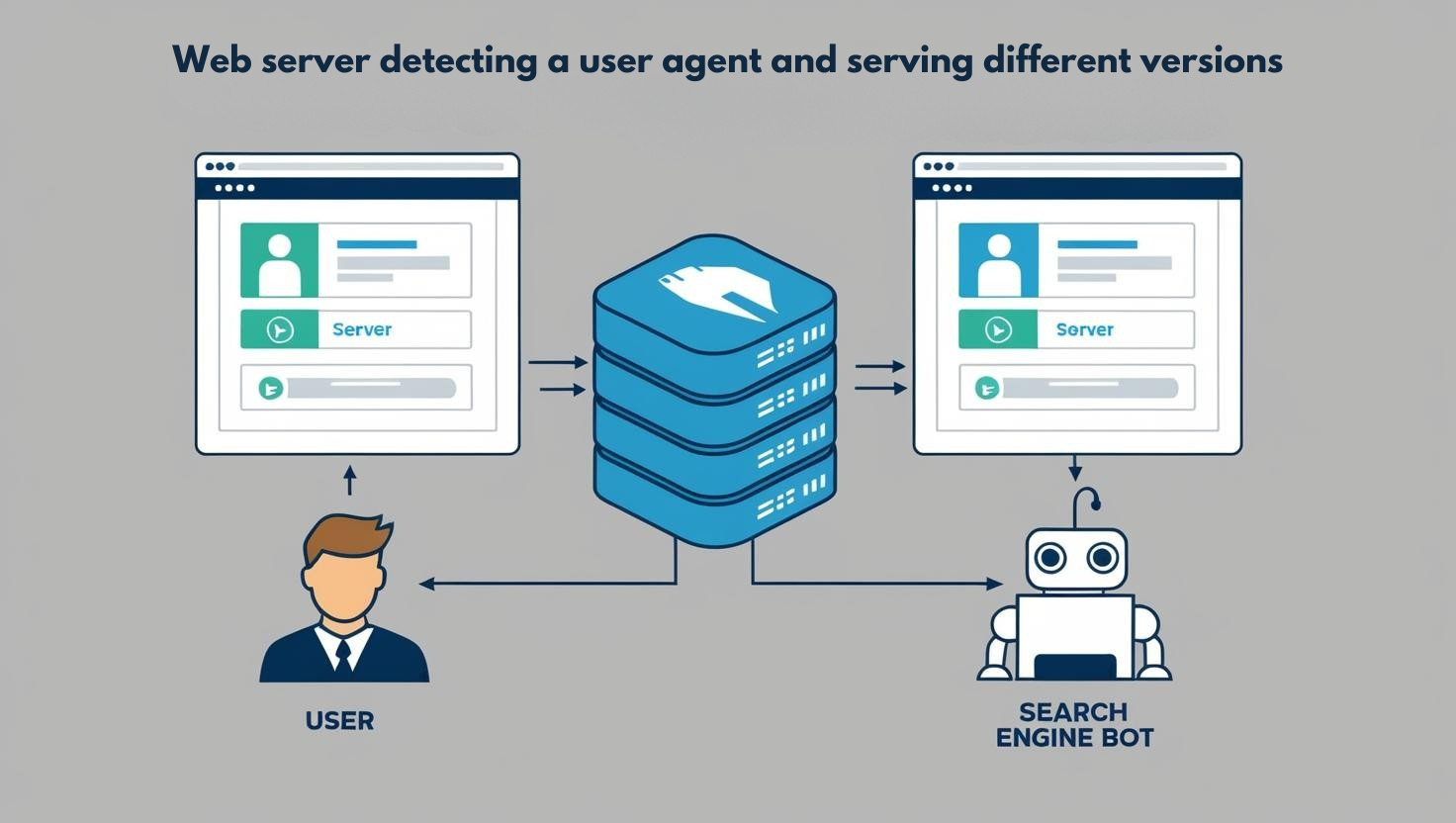
The idea is simple. When a regular user visits your site, they get the usual JavaScript-heavy experience. But when a search engine bot shows up, you serve it a pre-rendered, static version of the page. This makes it easier for the bot to crawl and index your content correctly.
So how do you decide if you need it? Start by asking: Is your content dynamic or updated often? Is it built with a front-end framework like React or Angular? If yes, dynamic rendering can solve those SEO headaches.
It’s like handing out the cheat sheet to bots while giving real users the full experience.
Here’s the image that fits perfectly:

This helps visualize the behind-the-scenes decision-making process.
Dynamic rendering isn't for every site—but if bots are missing your content, it's a fix worth exploring.
When to Use Dynamic Rendering
Dynamic rendering isn't a one-size-fits-all solution. It's best used strategically in situations where specific challenges with web content visibility and performance arise—particularly for bots, crawlers, and non-JavaScript-compatible environments. Here's when it makes the most sense to use it:
1. Websites with Rapidly Changing Content
When your site updates content often—like new posts, listings, or user activity—it can be tough for search engines to keep up. Crawlers visit your site on their own schedule, and they don’t always wait around for JavaScript to load everything. That means key updates might go unseen.
Ask yourself: is your content changing more often than it’s getting crawled?
If yes, search engines might miss important pieces, especially on JavaScript-heavy pages. This isn't about the users—they'll see the updates just fine. But bots? Not always. That's where things start slipping through the cracks, even when your content is live.
2. JavaScript-Heavy Applications
If your web app relies heavily on JavaScript to build and display content, search engines might struggle to see what’s actually there. You may assume Google can render everything, but in reality, it queues JavaScript processing separately—and that can take time or fail completely.
Now ask yourself: is most of your content generated after the page loads?
If yes, there's a good chance crawlers are missing it.
This is especially common in single-page applications, where the HTML is nearly empty until the JavaScript kicks in.
That means what users see isn’t always what bots see—and that’s a problem.
3. Third-Party Platform Compatibility
Not all platforms visiting your site are full-featured browsers. Some, like social media scrapers or chat apps, just grab a quick snapshot of your page. They don’t run JavaScript—they just look at the raw HTML and bounce.
So, if your content relies on JavaScript to load, these platforms might miss key details like titles, images, or descriptions. That means your link previews could end up blank or wrong.
Now ask yourself: if a user shares your page, does the preview look how you want it to? If not, it’s probably because those scrapers aren’t seeing your content at all.
4. Backward Compatibility
Sometimes, your users aren’t using the latest devices or browsers. Maybe they're on an old phone, or a corporate system stuck with outdated software. These environments often don’t handle JavaScript well—or at all.
That’s where dynamic rendering can quietly step in. You can still deliver your rich, interactive app to modern browsers, but show a simpler version to the rest.
Think of it like speaking two languages fluently. You choose the one your listener understands.
If a browser can’t process your JavaScript, why force it?
Just give it something it can read—and everyone still gets the message.
5. Budget-Conscious Crawling
Crawl budget sounds technical, but it’s really just about how many pages search engines are willing to crawl on your site. They don’t have unlimited time.
So if your site is big or loads slowly because of JavaScript, some pages might get skipped. That means even important pages could go unnoticed.
You’ve got to think: is Google spending its limited time crawling your actual content or waiting for scripts to run? If rendering takes too long, fewer pages get indexed.
So for large or dynamic sites, this becomes a real concern. You’re basically in a race against the bot’s patience.
How to Implement Dynamic Rendering
Implementing Dynamic Rendering for complex web apps involves creating a strategy that serves different versions of your web content to users and search engine crawlers. Here’s a step-by-step guide to help you implement dynamic rendering effectively:
1. Determine If You Need Dynamic Rendering
Before you dive into dynamic rendering, pause for a second and ask yourself—do you actually need it?
Not every web app does. The main reason to consider dynamic rendering is if your site relies heavily on JavaScript and search engines can’t see your content properly. If crawlers visit your site and only see a blank page or a loading spinner, that’s a red flag.
Here’s how you figure that out.
Start by testing your pages with tools like Google Search Console. It shows how Googlebot sees your site. If key content like text, titles, or product info is missing from the rendered view, that’s a sign your client-side rendering is getting in the way.
Next, think about how often your content changes. If it's dynamic—like user profiles, comments, or real-time listings—then pre-rendering everything ahead of time might not be practical. That’s where dynamic rendering helps.
Also, are you seeing SEO performance issues? Pages not ranking? Low impressions despite having great content? It might be because crawlers can’t index what they can’t see.
If your app hits one or more of these points—heavy JavaScript, constantly changing content, SEO issues—you’re a good candidate for dynamic rendering.
If not, simpler solutions might do the trick.
2. Choose a Pre-rendering Tool
When you're setting up dynamic rendering, the first real decision you’ll face is which pre-rendering tool to use. The goal here is simple: bots need clean, static HTML versions of your pages without having to run JavaScript. But you don't want to build that manually, right? That’s where pre-rendering tools come in. They automate the process by loading your web pages, waiting for all the JS to finish, and then capturing the final HTML.
So, how do you choose the right one? It depends on how much control you need and how hands-on you want to be. If you're comfortable coding and want flexibility, a tool like Puppeteer is great. It gives you full control over how pages are rendered and what gets sent out.
But if you just want something that works out of the box, with less setup, go for a plug-and-play service like Prerender.io. It handles caching, scaling, and even integrates with popular CDNs.
Rendertron is another solid option, especially if you're running your own Node.js server.
To understand better, here is the comparison table between Puppeteer, Prerender.io, and Rendertron.
Puppeteer | Prerender.io | Rendertron | |
Type | Headless browser library | Managed rendering service | Self-hosted rendering server |
Ease of Use | Moderate (needs coding) | Easy (plug-and-play) | Easy to Moderate |
Customizability | High | Low to Moderate | Moderate |
Caching | Manual | Built-in | Optional (with setup) |
Scalability | Manual (you manage it) | Automatic | Depends on your setup |
Integration Effort | High | Low | Moderate |
Open Source | Yes | No (proprietary) | Yes |
Best For | Full control and flexibility | Quick setup with minimal config | Node-based environments |
All of these tools serve the same purpose, but they do it differently. Pick based on your app’s complexity and your own comfort with infrastructure.
3. Set Up User Agent Detection
To make dynamic rendering work, you need to figure out who’s visiting your site—a real user or a search engine bot. Why? Because you’ll only serve the pre-rendered HTML to bots. For everyone else, your regular JavaScript app does the job.
So, how do you tell the difference?
The easiest way is by checking the user agent. It’s a small string sent with every request that identifies the browser or crawler. Bots like Googlebot or Bingbot have their own unique user agents.
Here’s a simple way to detect bots using JavaScript on your server:

You can use this isBot() function inside your server logic. When a request comes in, check the user-agent header. If it matches any of those patterns, treat it as a bot.

That’s it. You don’t need to overthink it.
Just be consistent and only render for real bots, not for every odd string pretending to be one.
4. Serve Pre-rendered Content to Bots
At this point, you’ve already figured out whether a request is coming from a bot or a real user. Great. Now it’s time to serve the right content to each of them. For regular users, your app works just like normal—they get the JavaScript-heavy, interactive version. But for bots like Googlebot, you want to serve them a clean, fully-rendered HTML version of your page.
Why? Because bots aren’t always great at running JavaScript. If they can’t see your content, they won’t index it properly. That’s a problem for SEO. So instead of hoping bots will run your JavaScript, you give them exactly what they need—pre-rendered HTML. Simple.
Here’s how it works:
When a bot visits your site, you intercept the request. Then you fetch the pre-rendered version of that page from a rendering service like Puppeteer, Rendertron, or a third-party like Prerender.io. Once you have that static HTML, you send it back to the bot. And that’s it. From the bot’s perspective, it’s just a clean, crawlable page with all the content in place.
You can easily implement this in Express.js using middleware. This little piece of code does exactly that:

Let’s break that down.
First, the app checks the user agent to see if it’s a known bot. If it is, it forwards the request to a pre-rendering service running at localhost:3000. That service returns fully-rendered HTML, which is then sent back to the bot. If the visitor isn’t a bot, it just moves on to the next middleware—business as usual.
This setup gives crawlers exactly what they need without touching the user experience for real people. You’re not slowing down the app or changing anything for your users. You're just giving bots a shortcut to understand your content.
That’s the whole idea behind dynamic rendering: serving the right version of your site to the right visitor at the right time.
5. Host or Deploy Your Rendering Service
Now comes the part where you actually need to host or deploy your rendering service. Sounds technical? It is—but it doesn’t have to be complicated.
The main goal here is to have a system that takes your JavaScript-heavy page, renders it like a browser would, and gives back clean HTML. This HTML is what you serve to bots like Googlebot. The question is, where does this rendering happen?
You have two main paths. One, you host the rendering service yourself. Two, you use a third-party service that handles everything for you. Let’s break that down.
If you want full control and don’t mind a bit of setup, self-hosting is solid. You can use tools like Rendertron or Puppeteer. These spin up a headless Chrome instance behind the scenes. It behaves like a real user, loads your page, waits for all the JavaScript to finish, and gives you the final HTML. You’ll usually run this on a Node.js server, often inside Docker.
It’s powerful. You decide how it runs, when to update, how to cache, and more. But yeah—it’s also your job to keep it alive, secure, and fast.
Now, if that sounds like a bit much, there’s the hosted route. Services like Prerender.io take care of everything. You plug them into your server, set up routing for bots, and you’re done. They give you caching, logging, and reliability without you managing infrastructure. Of course, you pay for that convenience.
So here’s the decision framework:
- Want control and flexibility? Self-host it.
- Want ease and peace of mind? Go with a managed service.
Either way, you’re building a smarter system—one that plays nicely with crawlers while keeping your app dynamic for real users.
6. Ensure Content Parity
When you’re setting up dynamic rendering, one of the most important things you need to get right is content parity. Simply put, the content you serve to bots should match what real users see. Why? Because search engines want transparency. If they detect that you're giving them one version and users another, they might think you're trying to game the system. That’s called cloaking, and it can hurt your site’s SEO.
So, how do you ensure parity without overcomplicating things? Start by checking your rendered HTML. Use your browser to inspect what users see, then compare it to what bots like Googlebot see. Are the page title, meta description, and main text the same? If not, fix it. You don’t need pixel-perfect design for bots, but the core content and structure should match.
Think about what really matters on your page. Is it a product description, a blog post, or maybe a list of services? That’s what the crawler should see too. Bots don’t need fancy animations or dynamic filtering—but they do need the actual information.
Now, imagine a user visits your site and finds something useful. Google should be able to find that same thing, or it won’t show your page in search results. That’s the goal. You’re not just doing this for compliance, you’re doing it to make sure your content gets found.
Run regular tests. Fetch your page as Google, look at the source, and see if it lines up with what you expect. If it doesn’t, now’s the time to tweak.
7. Implement Caching
So, you’ve got dynamic rendering set up. Awesome. But here’s the catch—rendering pages for every bot request? That’s going to hit your server hard. It’s like baking a fresh cake every single time someone asks. Not scalable. That’s where caching steps in.
The idea is simple: render once, reuse many times. You generate the HTML once for a bot, store it temporarily, and serve it instantly for future requests. It saves server power and slashes response time. You’re not burning resources for the same output again and again.
Now, how do you decide what to cache? Think about which pages get hit most often by crawlers. Product pages, blog posts, landing pages—these usually don’t change every second. Cache those. But don’t blindly cache everything. If your page updates every few minutes or shows user-specific content, you’ll need a smarter setup.
Time-To-Live, or TTL, is key here. It decides how long the cached version stays alive before refreshing. Short TTLs are great for fast-changing pages. Longer ones work well for static or evergreen content. You control the balance between freshness and efficiency.
You can cache at multiple levels. Start with your rendering service. Tools like Rendertron or Prerender.io support built-in caching. Add a layer at your server or proxy level—like Nginx or even a CDN. Each layer cuts the workload a bit more.
Once it’s running, monitor everything. Check how often the cache is used, when it expires, and if it’s actually improving speed. That’s how you keep things lean and smooth without losing control.
8. Monitor and Test
Once you’ve set up dynamic rendering, your job isn’t done. You’ve got to keep an eye on it. Why? Because bots don’t complain when something breaks. If Googlebot can’t crawl your pages or sees outdated content, your rankings quietly take a hit. That’s why monitoring and testing are critical.
Start by using Google Search Console. It shows how Google sees your pages. Use the URL Inspection Tool—drop in a link and see what’s being indexed. If the preview looks weird or content is missing, something’s off.
Lighthouse is another solid tool. It gives you SEO scores and checks for common issues like missing meta tags or slow page loads. It’s built into Chrome DevTools, so it’s easy to run.
Make sure your pre-rendered pages are consistent with what users see. No surprises. You’re not trying to trick Google—you just want to help it understand your site. If the bot sees one thing and users see another, that’s cloaking. And cloaking is bad news.
Check your server logs too. Are bots hitting the pre-rendered routes? Are they getting served 200 OK responses? Or are they bouncing off with errors? You’ll spot misconfigurations here.
Set up alerts for rendering failures or traffic drops. You can use a simple logging system or plug into your existing monitoring stack.
Also, don’t forget about caching. If bots are seeing stale content, you’re not helping them—or yourself. Rotate cache based on update frequency.
Regular check-ins keep your setup solid. No guessing. Just clear signals and smart adjustments.
9. Use Framework-Specific SSR (Optional)
Sometimes, dynamic rendering isn't the best long-term strategy. That’s where server-side rendering (SSR) built into your framework can save you time and effort.
If you're using something like Next.js, Nuxt.js, or SvelteKit, you already have SSR support baked in. These tools let you render pages on the server when a request comes in, sending a fully built HTML page to the browser or bot. No need to detect user agents or set up a separate rendering service.
Ask yourself this: Do I really need to manage two versions of my app—one for bots and one for users? If not, leaning into SSR might be the cleaner route.
It works out of the box, is SEO-friendly, and scales better in many cases. You can still mix in client-side rendering where needed. So if you're already using one of these modern frameworks, go with their SSR features before reaching for dynamic rendering hacks. It's just simpler.
Alternatives to Dynamic Rendering
Here’s a detailed breakdown of Alternatives to Dynamic Rendering, which can be used depending on your web app’s needs, especially for SEO, performance, and complexity management:
1. Server-Side Rendering (SSR)
Server-Side Rendering, or SSR, is when your server builds the HTML for each page before sending it to the browser. This means users and search engines get content right away, without waiting for JavaScript to load everything.
If your app depends on SEO or loads slowly on the first visit, SSR can be a smart move. It works best when pages have dynamic data but need fast initial loads.
Let’s say your app shows user dashboards or news feeds—that’s where SSR shines.
It’s efficient, reliable, and improves user experience.
2. Static Site Generation (SSG)
Static Site Generation, or SSG, is a way to build your site ahead of time—before anyone even visits it. Instead of rendering pages on the fly, you generate them during the build process. This means every page becomes a ready-to-serve HTML file. It’s fast, secure, and easy to host.
So when should you use it? Ask yourself: does your content change often?
If not—like in blogs or documentation—it’s perfect. Your site loads instantly, uses fewer server resources, and scales well. But if your app relies on real-time updates or personalized data, you might want something more dynamic. Choose based on your content’s needs.
3. Client-Side Rendering (CSR)
Client-Side Rendering, or CSR, means your browser does most of the heavy lifting. When you visit a page, it gets a mostly empty HTML file, and JavaScript fills in the content.
Sounds cool, right? But here's the catch — it can feel slow at first. The browser has to download, parse, and run all that JavaScript before you see anything useful.
Still, CSR works great when you need rich interactivity or dynamic user experiences. If SEO isn't a huge priority and your users are mostly logged in, it's a solid choice.
4. Incremental Static Regeneration (ISR)
Incremental Static Regeneration, or ISR, gives you the best of both worlds—speed and flexibility. Imagine your site is mostly static, but a few pages need to update now and then. You don't want to rebuild the whole thing every time, right? ISR handles that for you.
It builds static pages at first, then quietly updates them in the background when needed. No user downtime. No full redeploys.
You just tell your framework how often to revalidate a page. That’s it. New content appears without a fuss.
It’s perfect when some pages change often, but not instantly, like product listings or blog posts.
5. Jamstack Architecture
Imagine building a web app where your frontend, backend, and content don’t have to live in the same place. That’s what Jamstack is all about. It stands for JavaScript, APIs, and Markup. You build the site ahead of time, serve static files through a CDN, and call APIs when you need something dynamic.
Why go this route? Because it’s fast, secure, and scalable.
You’re not waiting for a server to piece things together on the fly.
Need dynamic features like forms or payments? Just plug in an API.
Jamstack lets you move fast, stay lean, and deliver solid performance.
6. Pre-Rendering (Static Pre-Rendering)
Pre-rendering is a smart way to make your JavaScript-heavy site more SEO-friendly without changing your entire setup.
Instead of letting crawlers struggle with scripts, you serve them a static HTML snapshot of the page. Simple, right? It’s like giving search engines a clear picture, while regular users still get the dynamic experience.
This works best when your content doesn’t need real-time updates. You just pre-generate the page and store it. When a bot visits, boom—it gets the pre-rendered version. Tools like Puppeteer or Prerender.io help with that. It’s fast, efficient, and a great workaround for improving visibility.
Start Simplifying Your Rendering Strategy Today
So, now you know what dynamic rendering is and why it matters.
But should you use it?
That depends on what kind of app you're building. If it's content-heavy, relies on JavaScript, and needs solid SEO, dynamic rendering might just be the fix you're looking for. It's not always the first solution, but it’s a smart one when others fall short.
Think of it like a shortcut for crawlers—they get clean HTML, and your users still enjoy the full app experience.
The key is making sure both see the same content. Don’t overcomplicate it.
Start simple. Use tools that fit your stack. Test with real crawlers. And if something breaks, fix it fast.
Plenty of successful apps use this method to boost visibility without rewriting their front end. You can too.
So, weigh your needs, pick your tools, and start small.
When done right, dynamic rendering bridges performance and visibility beautifully.
FAQs
1. What if my app changes too often for pre-rendering?
That’s exactly when dynamic rendering helps. It creates fresh HTML for bots while your users still get the interactive app. No need to pre-render every change—you handle updates in real-time without losing SEO.
2. Will users see different content than search engines?
They shouldn't. That’s called cloaking, and it can hurt SEO. Dynamic rendering must show the same core content to both bots and users. Just format it differently—HTML for bots, full app for users.
3. Can I use dynamic rendering without switching frameworks?
Yes! Most setups don’t need a complete overhaul. Tools like Puppeteer or Rendertron work with what you have. You can keep your current stack and add dynamic rendering as a layer on top.
4. Do I need dynamic rendering if my app isn’t public?
Not really. Dynamic rendering is for SEO and discoverability. If your app is private or behind a login, search engines don’t need to see it—so no need to render anything for them.
5. How do I test if bots see my content?
Use tools like Google’s URL Inspection or “Fetch as Google.” They show exactly what a crawler sees. If the content’s missing or broken, your rendering setup needs tweaking. It’s a simple and essential check.