
What is Duplicate Content in Multi-Currency Context?
Let’s say you’re running a Shopify store that sells to customers in the US, UK, and Australia. You’ve set up multi-currency support so visitors can see prices in their local currency. Sounds perfect, right?
But here’s the thing—search engines don’t see this setup the way your customers do. They see multiple versions of the same product page, just with different currency displays. To them, it’s like you’ve published nearly identical pages across different URLs. And that’s where the duplicate content problem begins.
Now, what exactly is duplicate content?
In SEO terms, it's when the same or very similar content appears on multiple URLs—either within your site or across different domains. This confuses search engines because they can't tell which version to rank. In return, your visibility suffers.
In multi-currency Shopify stores, this often happens unintentionally. Shopify might generate URLs like:
- example.com/products/blue-shirt
- example.com/products/blue-shirt?currency=USD
- example.com/products/blue-shirt?currency=GBP
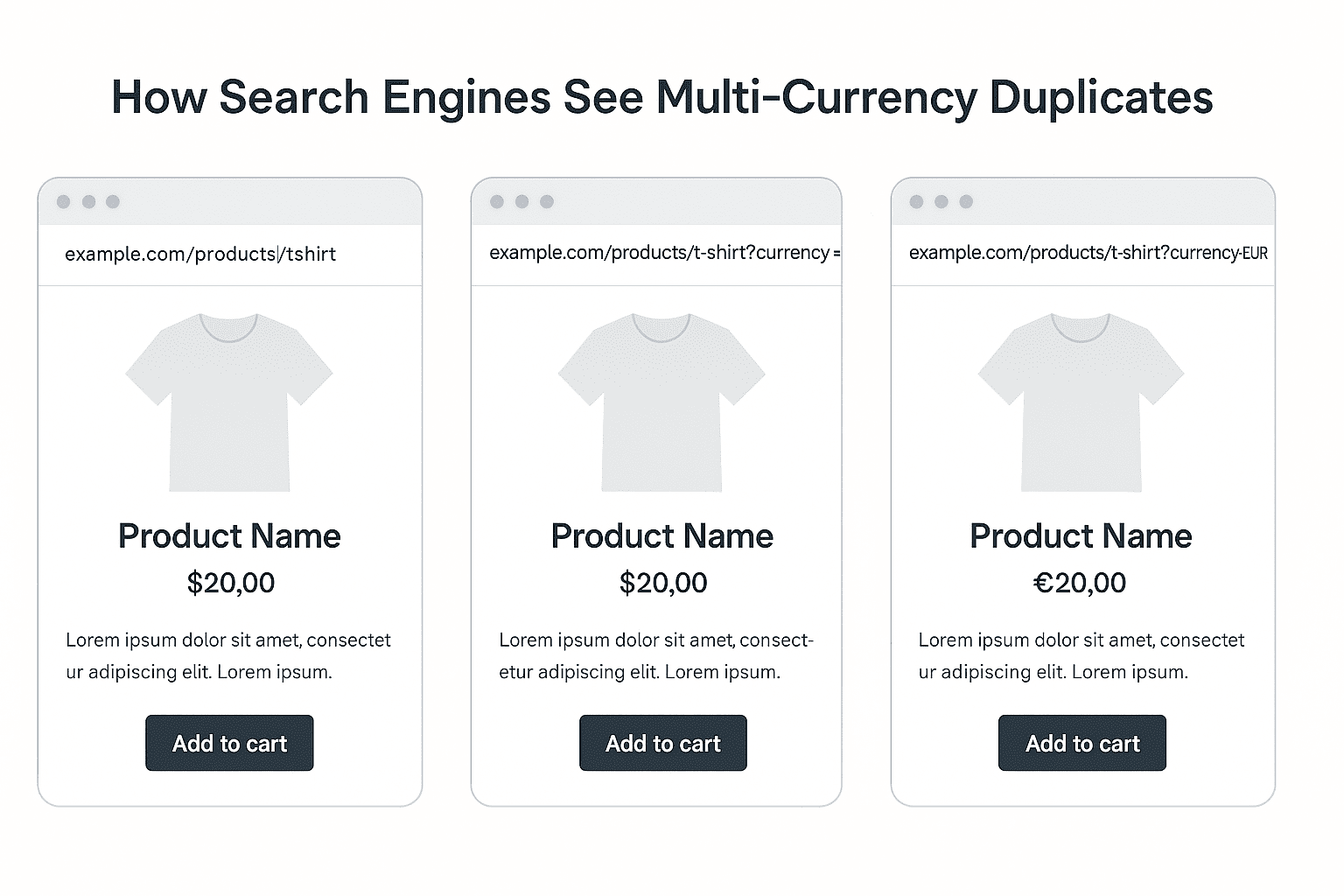
These look the same to your visitors—just a different currency on the price tag. But to Google, each one is a separate URL with duplicate content.
This is a big deal, especially if your store is targeting international markets. When you have different currencies tied to URL parameters like ?currency=, those variations start clogging up your crawl budget.
Google bots spend time scanning these unnecessary clones instead of discovering your newer, high-priority pages.
Take a quick look at this visual—it shows exactly how search engines get confused by multi-currency page duplicates.

Back to the logic—now you might wonder: "Can’t Google figure this out on its own?"
Sometimes, yes. But often, Google needs help deciding which version is the “main” one. If you don’t step in and guide it (we’ll cover how in later sections), your site could face diluted rankings, cannibalized keywords, and lower visibility—especially in competitive markets.
So, managing duplicate content isn't just about being technically correct. It’s about ensuring your site’s authority isn’t spread thin across meaningless variations. And when your store is scaling globally, this becomes even more important.
Let’s now look at how Shopify behaves with currency settings and what that means for your SEO setup.
Shopify Multi-Currency Behavior
Now that you know how duplicate content happens, let’s dive into how Shopify actually handles currencies behind the scenes because this setup plays a huge role in how those duplicates are created in the first place.
When you enable multi-currency in Shopify (either through Shopify Payments or Shopify Markets), the platform lets your users view prices in their local currency. It sounds smooth on the surface. But the way Shopify delivers that experience isn’t always SEO-friendly.
Here’s what usually happens:
Shopify doesn’t create completely separate pages for each currency. Instead, it often uses URL parameters—those bits you see after a question mark, like ?currency=EUR. This makes the page look like it’s changing based on the currency, but really, it’s just adjusting the displayed price dynamically.
“So you’re not creating new content for each currency, but you are creating new URLs—and that’s what search engines latch onto.”
Let’s say someone lands on your site from Germany. They might be redirected to a version with ?currency=EUR. Another user from the US sees ?currency=USD. Same product, same description, same everything—just a different currency.
The problem is, Shopify doesn’t automatically tell Google which of these should be prioritized. By default, there’s no native mechanism for:
- Setting canonical URLs across currency versions
- Injecting hreflang tags based on currency or region
- Preventing bots from crawling and indexing currency-switched pages
This means, unless you manually configure these settings (we’ll walk through how to do that later), Google might treat each version as a standalone page—which leads to the kind of mess we talked about earlier.
Also, if you’re using Shopify Markets, you get a bit more control. It lets you configure local domains or subfolders for different regions, which is a step in the right direction. But again—Shopify Markets doesn’t automatically resolve the duplicate content issue either. You still need to handle canonicals, hreflang, and structured data on your own.
Here’s what it boils down to:
Shopify is built for sales first, SEO second. The platform assumes that as long as the end user sees the right currency, all is well. But for search engines, the technical setup behind that experience matters—a lot.
If you're planning to scale internationally and don’t want to leave organic traffic on the table, you'll need to take an active role in controlling how Shopify’s currency logic affects your site’s visibility.
Next, let’s explore the actual SEO risks this can cause—and why ignoring them can cost you rankings (and revenue).
SEO Risks of Duplicate Content
When you're running a Shopify store that supports multiple currencies, it's easy to unintentionally create duplicate content—which can seriously harm your SEO if left unchecked. Here's how:
1. Keyword Cannibalization
Imagine you’re trying to rank for the keyword “black leather wallet.” If Google finds three versions of the same product page—one in INR, one in USD, one in EUR—it doesn’t know which one is the main version.
What happens next?
All three pages might end up competing with each other.
Instead of boosting your visibility, you're splitting your keyword strength. This is called keyword cannibalization, and it quietly kills your SEO performance without you even noticing.
2. Diluted Link Equity
Here’s something you may not think about: every time someone links to one of your product pages (maybe a blogger, a partner, or even an affiliate) they’re giving you SEO juice.
But if links are pointing to multiple currency versions of the same product, that link equity doesn’t go to one strong page. It’s spread thin across multiple weak duplicates.
So instead of building one strong, high-authority URL, you end up with several average-performing pages—none of which dominate the search results.
3. Wasted Crawl Budget
Search engines only crawl a limited number of pages per site, especially if your store has thousands of products. That’s your crawl budget.
Now, if Googlebot is wasting its time crawling pages like:
- /product-name?currency=USD
- /product-name?currency=AU
- /product-name?currency=CAD
—it’s spending less time crawling your new arrivals, collections, or blog posts.
That’s bad news for your freshness and discoverability.
4. Indexing Issues & Ranking Drops
Duplicate content can cause search engines to ignore your preferred page. They might index the wrong version, or not index it at all.
You may suddenly see one product disappear from Google search even though it’s live, optimized, and ready to convert.
Why? Because Google chose a non-preferred duplicate or got stuck choosing between conflicting versions.
So, the bottom line is: Duplicate content in multi-currency setups isn’t just a technical inconvenience. It directly affects your search rankings, traffic, and revenue.
If you're not actively managing this, you’re letting your Shopify store compete against itself—and that’s a battle you’ll lose every time.
Next up, let’s talk about how to fix this and take control of your content with the right SEO strategy.
Strategies to Manage Duplicate Content in Shopify Multi-Currency Stores
So, you've got a clear idea now of why duplicate content from multi-currency setups is risky. But what can you actually do about it?
The good news: you don’t need to overhaul your entire Shopify store. What you need is a smart, layered strategy to tell search engines:
“Hey, this is the main page. Ignore the rest.”
Let’s break down the most effective ways to manage it—without breaking your store or confusing your users.
1. Use Canonical Tags Properly
When you run a Shopify store with multiple currencies, one of the first things you need to do is decide which version of each product page is the “main” one—the one you want search engines to rank.
Because without that direction, search engines can get confused. They’ll find the same product served under different URLs—one with INR, another with USD, maybe another with EUR—and they’ll treat each as a separate page. Which means your SEO value gets split for no reason.
So, what do you do?
You set a canonical URL. This is a special HTML tag that quietly tells Google,
“Hey, this is the main version of the page. Ignore the others for ranking purposes.”
Now here's the part that matters for Shopify: Shopify already adds canonical tags by default, but it doesn’t always do it right—especially when currencies get involved. For example, if a user switches currency, the URL might look like this:
http://example.com/products/blue-shirt?currency=USD
Without any correction, Shopify might assign the canonical tag to that same URL—with the parameter. That’s not ideal.
What you really want is for every currency version to point back to one default, clean product URL—the one without any parameters. This keeps all your SEO signals (like backlinks, crawl priority, and ranking potential) focused on one version.
So, how do you control this in Shopify?
Inside your theme, you’ll find a Liquid tag called {{ canonical_url }}. This tag pulls the canonical version dynamically for the current page. But you can improve it.
In your theme.liquid or product template, wrap your canonical logic like this:
<link rel="canonical" href="{{ shop.url }}{{ product.url }}" />
This ensures that regardless of currency or session, the canonical always points to the main product path.
It’s a small tweak—but it makes a big difference.
Because now, search engines know exactly which page to index, and you don’t risk splitting authority across versions that only differ by the price tag.
And as your site grows internationally, keeping that SEO signal focused becomes more important than ever.
2. Avoid Indexing Query Parameters
Shopify’s multi-currency setup often relies on query parameters like ?currency=USD or ?currency=INR to switch prices.
At first glance, this seems harmless. You're just letting users view the same product in their preferred currency. But the problem isn’t what users see, it’s what Google sees.
Search engines treat every URL variation, even with a tiny difference, as a separate page unless you tell them otherwise. So when Shopify generates currency-specific URLs like:
- /products/t-shirt?currency=USD
- /products/t-shirt?currency=EUR
these get indexed as unique pages unless controlled—and that’s where duplication quietly creeps in.
Now, you don’t want Google wasting its crawl budget or splitting ranking signals across pages that are basically identical apart from a currency symbol.
So what’s the solution?
Instead of blocking access to these pages completely (which can sometimes hurt user experience), you should prevent them from being indexed. That means you let bots crawl them if needed, but you instruct them not to include these in search results.
The easiest way to do this in Shopify is by injecting a meta noindex tag into any URL that includes the currency parameter.
Here’s how to think about it:
- If the URL contains ?currency=, add this tag in the <head>: <meta name="robots" content="noindex">
- Leave the default product pages untouched—those should still be indexed.
This approach keeps your currency switcher functional for users, while signaling to Google that it shouldn’t waste time indexing each variation.
And if you're managing your site via Shopify Plus or using apps that affect URLs, make sure those tools don’t override this logic. Sometimes, third-party apps will unintentionally allow currency variants to get indexed again unless configured properly.
If you want to go one step further, you can also use the URL Parameters tool in Google Search Console, but that should only be done if you’re confident in your parameter behavior. One wrong setting there can block important pages.
3. Use Shopify Markets’ Native SEO Controls
If you’re selling internationally, there’s a good chance you’ve started exploring Shopify Markets—Shopify’s built-in tool for managing multiple regions, currencies, and languages under one roof.
What’s great is that Shopify Markets doesn’t just handle pricing and payments—it also gives you a few smart controls to clean up your international SEO mess, especially when it comes to duplicate content.
Now here’s the first thing you need to understand: Instead of just switching currencies using query strings like ?currency=USD, Shopify Markets can help you assign unique subfolders or subdomains to each market. For example:
- example.com/ for the default store
- example.com/en-gb/ for UK visitors
- example.com/en-au/ for Australia
This way, you’re telling search engines—“Each of these is a distinct version meant for a different audience.”
And once you do that, Shopify can auto-generate hreflang tags and proper canonical links, keeping your site structure neat and search-friendly.
“Instead of letting Google guess what’s what, Shopify Markets gives you a structured way to say: This version is for UK users, this one’s for the US, and so on.”
Now, of course, this depends on how you configure it.
By default, Shopify might still use currency parameters in URLs, but if you enable subfolder-based localization, it becomes much easier to manage both users and SEO from a single store backend.
Also worth noting that Shopify Markets lets you manage custom domains for different countries (like uk.yourstore.com), but most small to medium stores do just fine with subfolders—which are simpler to maintain and still great for SEO.
And don’t worry—you don’t need to be a developer to configure most of this. Shopify Markets is pretty intuitive, and even if you get stuck, it’s mostly toggles and checkboxes, not code.
Just make sure that when you're turning on multiple currencies and markets, you always double-check how those pages are being served—and what Google sees when it crawls them.
This one move can dramatically reduce confusion, avoid currency-related duplicates, and help your site rank better globally.
4. Prevent Crawling of Currency-Based URLs
Let’s get one thing straight—just because a page exists doesn’t mean Google needs to crawl it.
When you're using currency selectors in Shopify, it often creates URLs like this:
- /products/jacket?currency=USD
- /products/jacket?currency=CAD
Now technically, these pages show the same jacket with the same description and layout. The only thing changing is the currency. And while that matters for your customers, it’s not important enough for Google to treat each one like a separate page.
That’s where crawling control comes in.
The goal here is to stop search engines from wasting time crawling and indexing these tiny variations that offer no new value. Because the more they get distracted by this clutter, the less efficiently they crawl the stuff that does matter—like new products, blogs, or high-converting landing pages.
So how do you prevent that crawl bloat?
Here’s the decision framework:
- If you're not on Shopify Plus, you can’t directly edit your robots.txt. But you can still inject a meta noindex tag into the <head> of pages that contain a currency query. That quietly tells Google, “Hey, you can crawl this, but don’t index it.”
- If you're on Shopify Plus, you have more control. You can actually update the robots.txt.liquid file and add a disallow rule for currency parameters: Disallow: /*?currency=
Now, here's something important: Preventing crawling and blocking indexing are not the same thing. If you block the URL too early (like in robots.txt), Google might never see the canonical tag you’ve added to consolidate the content.
That’s why many SEOs prefer starting with noindex—so Google sees the page, understands it’s a duplicate, and then chooses to ignore it politely.
In short, you're not hiding your store. You're just teaching Google to focus on the stuff that really matters.
And once that clutter is gone, you’ll notice faster indexing, fewer duplicate warnings, and better crawl budget efficiency. All of which help your products perform better in organic search.
5. Create Clean URL Structures with Subfolders or Subdomains
If your store serves customers across multiple countries or currencies, your URLs should reflect that in a way that’s clean, crawlable, and SEO-friendly.
Relying on messy query parameters like ?currency=CAD or ?currency=SGD not only looks untidy but also creates unnecessary duplicates that Google may struggle to understand.
A better option? Use subfolders or subdomains to clearly separate versions of your site for different regions.
This tells search engines, “Hey, this is the version for the UK, and that one’s for the US.”
Plus, it gives you better control when applying hreflang tags, setting up geo-targeting, or analyzing traffic in Search Console.
Here’s how the difference looks:
Currency | Query Parameter | Subfolder URL | Subdomain URL |
USD | example.com/product/shirt?currency=USD | example.com/us/product/shirt | us.example.com/product/shirt |
EUR | example.com/product/shirt?currency=EUR | example.com/eu/product/shirt | eu.example.com/product/shirt |
INR | example.com/product/shirt?currency=INR | example.com/in/product/shirt | in.example.com/product/shirt |
Now, which one of these looks like it has a structure Google can trust? Definitely not the first.
Pick whichever format fits your setup—subfolders are easier to manage on Shopify, while subdomains offer more isolation. The key is to avoid cluttering URLs with parameters that confuse both bots and users.
6. Implement Hreflang Tags Correctly
Once you've cleaned up your URL structure with subfolders or subdomains, the next thing you need to do is tell search engines which version of your content is for which audience.
That’s where hreflang tags come in.
These tags act like road signs for search engines. They explain,
“Hey Google, this page is for English-speaking users in the US,”
“This one’s for UK visitors,” “And this other version? That’s for Spanish-speaking shoppers in Spain.”
That’s really helpful when you’ve got similar pages—maybe even identical ones—that are targeting different markets.
Without hreflang tags, Google might show your UK product page to a user in Canada, or your India page to a shopper in Australia. Not ideal.
Now here’s the key part: Hreflang works best when paired with localized URLs—like subfolders or subdomains—not just query strings.
For example:
- example.com/us/products/shirt → English, US
- example.com/uk/products/shirt → English, UK
- example.com/es/products/shirt → Spanish, Spain
In your code, you’d place hreflang tags in the <head> section of each of those pages like this:

Here’s a quick visual to show how hreflang works across country-specific product pages—makes it super easy to grasp:

Now, what if you’re using apps like Weglot or Langify?
The good news is, most of these apps handle hreflang automatically if you’ve set them up properly with localized URLs.
The bad news is, if you skip the configuration or mix languages with currencies without regional targeting, hreflang can get messy—and sometimes misleading.
So here’s the decision framework:
- Are you serving just different currencies?, Stick to canonical tags.
- Are you serving different languages or regional content (even if minor)?, Use hreflang.
Get that distinction right, and your international SEO will be much cleaner—and much stronger.
7. Avoid Automatic Currency Redirection Without User Consent
It might feel like a good idea to auto-redirect users to their local currency version based on their IP. After all, you're just trying to make shopping smoother, right?
But when it comes to SEO, automatic redirection can quietly backfire—especially if you're not giving users (or search engines) a choice in the matter.
Here’s what typically happens:
A customer from France lands on your U.S. homepage. Your system detects their location and instantly sends them to the EU store or changes the currency. Sounds smooth in theory.
But guess who also gets redirected? Googlebot.
And if Googlebot, which often crawls from U.S. IPs, gets forced into a different version—like your German store—it won’t see your default version at all. Which means it may never index the right content or may miss huge parts of your site entirely.
That’s why it’s important to give users control instead of making decisions for them. Let them land on the default version and suggest switching currencies, but don’t force it. Use a non-intrusive pop-up, a banner, or a currency selector—something that respects both the user and the crawler.
If you’re using an app or script that handles geo-redirection, double-check its settings. Many of them allow you to enable fallback behavior—for instance, show a popup instead of auto-switching or exclude bots from redirection altogether.
Also, make sure that search engine crawlers are whitelisted or bypassed in your redirection logic. Most good developers or apps can configure this by checking the user-agent.
The idea isn’t to avoid localization. It’s to do it responsibly, without harming your crawlability or creating a frustrating experience for users who might just want to browse in a different currency.
Always lead with the option, not the assumption.
8. Use JavaScript for Currency Switch (When Appropriate)
When it comes to handling currencies in Shopify, you don’t always need to change the URL. In fact, sometimes the smartest move is to not change it at all.
This is where JavaScript comes in handy.
Using JavaScript to switch currencies allows you to update the price display dynamically on the same page, without triggering a new URL or adding parameters like ?currency=INR. That means your visitors still see their local currency, but Google sees just one clean, crawlable URL—no duplication, no confusion.
It’s a win for both user experience and SEO.
Let’s say a user selects their currency from a dropdown. With a JavaScript-based switcher, the page doesn't reload, the URL doesn't change, and the content just refreshes in place. Behind the scenes, it’s pulling the relevant exchange rate and updating the price display—nothing more.
This keeps your internal linking structure clean and avoids creating endless versions of the same page for every possible currency.
“Search engines don’t need to see every currency—your users do. Let JavaScript bridge that gap quietly in the background.”
But of course, there's an interesting thing to that.
If you're using JavaScript, make sure that the dynamic prices don’t interfere with structured data (like your product schema). Otherwise, Google might read one price in your schema and another in your visible content—which can cause mismatches in rich results.
Also, keep accessibility in mind. Some setups rely too much on client-side rendering, which might delay content visibility or break when JavaScript is disabled (yes, that still happens).
So basically, JavaScript-based currency switching is ideal when your goal is simplicity and SEO hygiene. Use it when you don’t need different pages for different currencies—and you want to avoid cluttering your site with duplicate URLs.
9. Keep Product Schema Consistent
Now let’s talk about something that often gets overlooked—but can quietly hurt your SEO: your product schema.
When you're running a multi-currency Shopify store, your product page might look perfect to a customer. The price updates, the currency symbol changes, and everything feels localized.
But the question is: does your structured data reflect that change too?
Structured data, or schema markup, is what helps search engines understand the content of your page. For product pages, this usually includes:
- Product name and description
- Price and currency
- Availability (in stock or out of stock)
- Product reviews or ratings
If your page displays the price in Euros but your schema still says it’s in USD, that creates a mismatch. Google might flag it as an error or worse—show the wrong price in search results. And that’s a trust-breaker for both search engines and shoppers.
Let’s break this down further:
When you enable multi-currency, some apps or scripts only update the visual price. They don’t always sync with the JSON-LD schema sitting in your theme. So while the frontend says ₹1,200, the backend (schema) might still show $15.
That inconsistency confuses Google—and can result in:
- Rich snippets not showing up at all
- Wrong prices in search previews
- Structured data errors in Google Search Console
Here’s a quick visual to show you exactly how schema mismatch vs. accuracy looks side by side.

What you should do instead is this:
Whenever the price or currency changes on the frontend, make sure your theme logic or app also updates the priceCurrency and price fields inside the schema.
If you're using Shopify's default theme (like Dawn or Debut), you’ll find the schema markup inside a <script type="application/ld+json"> block in the product template. That’s where you need to insert dynamic Liquid variables like:
"priceCurrency": "{{ cart.currency.iso_code }}",
"price": "{{ product.price | money_without_currency }}"
Simple fix, big impact.
So remember, when it comes to structured data, it's not just about having it. It's about keeping it accurate and in sync with what the user actually sees.
10. Check for Self-Referencing Canonicals
Now, first things first—what does a “self-referencing canonical” mean?
It’s when a page tells Google,
“Hey, I’m the main version of myself.”
That’s fine when there’s only one version of the page. But it becomes a problem when Shopify auto-generates multiple versions of the same product with different query parameters—like ?currency=USD.
So if all those currency variations are using self-canonicals (i.e., they each say “I’m the main one”), it sends mixed signals to search engines.
You’re no longer consolidating SEO value. You’re actually splitting it across unnecessary duplicates.
Let’s look at this in a clean table to make the problem (and solution) easy to grasp:
Page URL | Canonical Tag Set To | What's Wrong? |
example.com/products/hat | example.com/products/hat | Correct – points to main/default |
example.com/products/hat?currency=EUR | example.com/products/hat?currency=EUR | Wrong – self-referencing duplicate |
example.com/products/hat?currency=INR | example.com/products/hat?currency=INR | Wrong – another self-referencing duplicate |
See the issue?
Every variant is telling Google:
“Index me!”
When in reality, they should all be deferring to the default product URL without any currency parameter.
Now, how do you fix it?
Inside your Shopify theme’s <head> section, make sure your canonical tag logic ignores query parameters. You can do this using a simple Liquid snippet:
<link rel="canonical" href="{{ canonical_url | split: '?' | first }}" />
This trims off anything after the ?, ensuring all variants point to the clean, original version of the page.
It’s a small line of code—but it makes a huge difference.
So, check your theme. Open a few product pages in different currencies. View the page source, search for rel="canonical", and see where it points.
If you catch self-canonicals on currency URLs, it’s time to fix that.
11. Remove Currency Parameter in Internal Links
This one’s often missed, but it quietly creates a massive tangle of unnecessary URLs in your store.
When someone switches currencies, Shopify (or the app you're using) might automatically add ?currency=USD or ?currency=INR to the product or collection page URLs. That alone isn’t the issue. The real problem starts when these currency-tagged URLs start spreading across your entire site through internal links.
Imagine that your homepage links to a best-selling product like this:
http://products/eco-bottle?currency=GBP
And now your collections, menus, footer, maybe even blog posts—all link to this one currency-locked version of the page. What happens then?
Google sees each version as a standalone page. You end up diluting your internal linking power by spreading it across several URLs that technically show the same thing.
So here’s what you need to do:
Make sure all internal links—whether in menus, featured products, sliders, or footers—point to the clean, default URL, without the ?currency= tag.
How?
Go into your theme code, find where links are being generated (often in product-card.liquid, collection-template.liquid, or navigation components), and update them to drop any currency query strings.
You can often do this by using Shopify’s Liquid filter:
{{ product.url | split: '?' | first }}
This strips off any query parameters and gives you a pure product URL. Clean, consistent, and SEO-safe.
Also, if you're using third-party apps for currency switching or store personalization, audit them too. Some apps automatically add currency tags to URLs during redirects or session changes—so test links manually after any update.
And, the bottom line is, Your internal links should all support one version of each page, not five lookalikes with currency tags stuck to the end. This keeps your SEO strong, clean, and efficient.
12. Use the Google Search Console’s URL Parameter Tool
Shopify loves query parameters. Especially when you start enabling multi-currency, you’ll often see URLs like:
http://example.com/products/bag?currency=INR
Now, to your visitors, these URLs don’t feel different. But to Google, each one can appear like a completely new page—unless you step in and set the record straight.
That’s where Google Search Console’s URL Parameter tool comes in. It lets you tell Google how to treat URLs with specific parameters, so they don’t waste time crawling 10 versions of the same product.
But before you use it, you need a clear plan. The last thing you want is to accidentally block important URLs from indexing.
Ask yourself: Does this parameter actually change the content on the page, or just how it’s displayed?
For currency parameters, the answer is almost always: it just changes display—not actual content. And that's your cue to configure the tool properly.
Here’s what you can do once you access the tool from your Search Console account:
- Add the parameter (e.g., currency)
- Select “Doesn’t affect page content”
- Choose the option: “Let Googlebot crawl only one URL”
That one small setting quietly tells Google, “Hey, this currency switch doesn’t matter for search ranking—just focus on the core page.”
Remember, this tool only applies to Google, not other search engines like Bing or Yandex. Still, it’s a strong move for sites that have a lot of parameter-generated noise.
Just be cautious. Misusing this tool can prevent legitimate pages from being crawled or indexed. So always start small—monitor results, and then apply it across your store.
It’s a silent but powerful way to take control of your crawl budget and guide Google in the right direction.
13. Regularly Audit Your Indexed URLs
You know what most people often ignore: Auditing which URLs are actually getting indexed by Google.Yes that’s true
Think about it—what’s the point of optimizing everything behind the scenes if Google is still indexing all those messy currency versions anyway?
You need to know what Google sees. And for that, you’ve got to check your indexed URLs regularly. Not once a year. Not just after a big update. Do it often, because Shopify and third-party apps can sometimes reintroduce problematic URLs without warning.
Start with Google Search Console. Go to the “Pages” or “Coverage” section and look at the “Indexed” URLs.
If you start seeing URLs like these:
/products/jacket?currency=USD
/products/jacket?currency=EUR
then you’ve got work to do.
Google is still finding and indexing duplicates, even though you’ve added canonicals. That means either your canonicals aren’t working as expected, or Google is choosing to ignore them for now (it happens).
So how do you fix this?
First, confirm that those duplicate pages have the correct canonical tags pointing to the default version. Then, decide whether you need to:
- Add a noindex tag to query-based URLs
- Block the currency parameter in Google Search Console’s URL Parameters Tool
- Revisit how your currency switcher is coded, especially if it’s app-driven
For deeper audits, tools like Screaming Frog, Ahrefs, or Sitebulb let you crawl your entire site and filter by query parameters like ?currency=, so you can bulk-detect duplicates.
The goal is simple: Make sure Google indexes only what matters—and skips the fluff that could hurt your rankings.
So if you're serious about keeping your multi-currency Shopify store clean, this audit needs to be part of your monthly SEO routine. Don’t wait for your rankings to drop before you investigate.
14. Minimize Session-Based or Cookie-Based Duplicates
Shopify doesn’t usually throw session IDs or cookie values into your URLs by default. But the moment you install third-party apps or enable tracking tools, things can get messy behind the scenes.
Suddenly, you’ll find URLs that look almost identical but have strange parameters like:
http://products/blue-shirt?sessionid=987xyz
Or,
http://products/blue-shirt?ref=popup_campaign
To your eyes, the page looks the same. To Google, it’s yet another duplicate URL.
Now here’s the core issue: These extras don’t actually change your content. But they do confuse search engines and inflate the number of pages they have to crawl, index, and rank.
That means your site’s crawl budget is wasted, and your link equity gets split across pointless duplicates.
So what should you do?
First, take a look at what kind of query strings your site is generating. You can use tools like Google Search Console, Ahrefs, or Screaming Frog to crawl your site and identify repeated patterns.
If you spot common non-content-changing parameters—like sessionid=, utm_source=, or currency=—you can take action.
Next, if you’re on Shopify Plus or have theme editing access, you can update your logic to strip or ignore these parameters for canonical and internal linking purposes.
If not, at the very least, set your canonical tag to always point to the clean version of the page regardless of any added junk in the URL.
Also, keep an eye on apps that dynamically modify URLs or inject tracking codes. If they’re not essential, turn them off—or ask the developer if those parameters can be handled through cookies or JavaScript without affecting the URL itself.
So, the key takeaway is You want fewer URLs, not more. Every unnecessary variant is a distraction for Google—and a potential SEO leak for your store.
15. Educate Your Team or Developer
Even if you’ve done everything right—canonical tags, hreflang, clean URLs—all your efforts can fall apart if your team doesn’t understand how duplicate content works.
Let’s be honest, Shopify stores are living systems. Themes get updated, apps get installed, developers make changes to Liquid files, and marketers add tracking or custom scripts. All of that is normal.
But every one of those updates is a chance for duplicate content issues to sneak back in.
So what should you do?
Take the time to explain the basics of SEO hygiene to your developer or agency.
This doesn’t mean they need to be SEO experts—but they should at least understand what a canonical tag is, when not to create a new URL, and how currency parameters can cause real problems in search performance.
The same goes for marketers or content editors on your team. If they’re adding campaign URLs with unnecessary currency or language parameters, or linking internally using long query strings, they might unintentionally spread link equity across duplicates instead of strengthening your main product pages.
"Your store’s SEO is only as strong as the least-informed person touching the code."
— and yes, that includes app developers you hired for a quick fix last year.
You can make things easier by writing down simple internal SEO rules like:
- “All product URLs must link to the default version without ?currency=”
- “Don’t remove or overwrite canonical tags unless you know why they’re there”
- “When changing theme code, re-test canonicals and structured data afterward”
And make it a habit to re-educate the team every time something major changes—like a new theme rollout, launching in a new country, or installing a new currency app.
Think of this step as insurance. Because duplicate content isn’t always caused by bad SEO—it’s often caused by good people doing things in the wrong order.
Conclusion
So here’s the bottom line: managing duplicate content in Shopify multi-currency stores isn’t just about fixing a few tags here and there. It’s about creating a clean, unified experience for both users and search engines. If Google sees multiple versions of the same content in different currencies, it gets confused about which one to rank. You don’t want that, right?
Start by setting strong canonical rules, keep hreflang logic clear if you're using multiple languages, and make sure your structured data reflects the right currency.
Don’t just set it once and forget it. Revisit these setups regularly because as your store scales or markets change, your SEO risks do too.
Stay intentional, test what works, and prioritize clarity. Because the easier you make it for Google, the better it rewards you.
FAQs
1. Does Shopify automatically prevent duplicate content for different currencies?
No, Shopify doesn’t automatically prevent duplicate content when currencies change. Currency switchers often create separate URL parameters, which can confuse search engines unless you set canonical tags or use proper SEO configurations manually.
2. Can different currency versions rank separately in search results?
Yes, they can, but that’s a problem. Search engines may view them as separate pages with similar content, causing keyword cannibalization. This dilutes your visibility unless managed with canonical tags or proper hreflang structure.
3. Should I noindex currency-parameter URLs?
Yes, if those URLs don’t provide unique content. Tagging them with noindex helps avoid duplicate indexing issues. But be careful not to block important pages or use it on URLs that get organic traffic.
4. Will using apps like Langify fix duplicate currency content?
Not completely. Apps like Langify help with language localization, not currency-specific SEO. You’ll still need to manage canonical tags, structured data, and indexing rules to avoid SEO issues tied to duplicate pricing URLs.
5. Can structured data cause duplicate content problems?
It can, if misconfigured. If structured data shows inconsistent pricing or currency across variants or markets, Google might treat them as separate versions. Always sync your schema with visible content and currency settings.