.png&w=3840&q=75)
Peak season shopping starts earlier than most brands think.
People now use AI tools to compare products, narrow choices, and decide what to buy before they ever visit a store. That shift is already influencing real sales. During Cyber Week 2025, AI and agents influenced 20% of global orders and helped drive $67 billion in sales, according to Salesforce data.
So if your product pages only cover basic features, you may be too late.
When someone asks, “Which backpack is best for office use and short travel?” or “What is a good beginner-friendly skincare product under a budget?” AI systems look for clear product details, reviews, pricing, use cases, and trust signals.
If your store is hard to understand, it is harder to recommend.
This guide will show you how to make your ecommerce site easier for AI systems to read, trust, and surface before peak season.
Let’s start with the basics that influence AI shopping recommendations the most.
Why AI Shopping Recommendations Matter Before Peak Season
Peak-season visibility is often decided before peak season begins.
Shoppers start researching early. They compare options, read reviews, and use AI tools to narrow choices before they are ready to buy. That early research shapes which brands AI systems surface later.
This is why timing matters.
The National Retail Federation found that 42% of holiday shoppers planned to start browsing and buying before November.

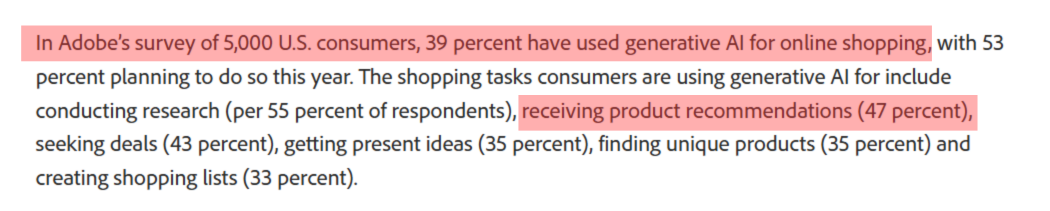
Adobe also reported that 39% of consumers have used generative AI for online shopping, while 47% of those users rely on it for product recommendations.
If your product data, reviews, and page content are weak during that research phase, you may lose recommendation visibility before the biggest shopping weeks even arrive.
Now let’s look at what your ecommerce brand should optimize first to improve those recommendations.
How Ecommerce Brands Can Prepare for AI Shopping Recommendations
AI shopping tools do not look at your product page the way a human does. They pull signals from your product data, your page structure, your reviews, your images, your pricing, and your overall trustworthiness.
If those signals are weak, messy, or incomplete, your products become harder to surface.
Here is how you prepare properly.
1. Clean Up Your Product Data First
If your product data is weak, AI shopping tools will struggle to place your product in the right recommendations.
So start there first.
Your product details should be clear, complete, and consistent across every listing. That means the title, product type, price, availability, size, color, material, brand, SKU, GTIN, shipping, and return details should all be filled properly.
This is what helps AI understand what the product is, who it is for, and when it should appear.
For example, “Men’s Shoes” is too broad. “Men’s Lightweight Running Shoes, Mesh Upper, Black, Size 9” gives real signals AI can use for matching and comparison.
Do not add extra words just to make the listing look detailed. Add the details that help AI understand the product faster and more accurately.
The clearer your product data is, the easier it becomes for AI to match it, compare it, and recommend it.
2. Optimize Product Feeds for AI Understanding
Your product feed is one of the first places AI shopping systems look to understand what you sell.
So treat it like a visibility asset, not just a technical file.
Make sure every product entry is specific and up to date. Use a clear product name. Add the right category. Fill in details like size, color, material, brand, price, and stock status. Keep the same information aligned across your site, Merchant Center, and marketplace listings.
This matters because AI relies on feed data to match products with shopper intent. If your feed is thin or inconsistent, your product becomes harder to place in the right recommendation.
A well-optimized feed removes confusion.
It tells AI exactly what the product is, what makes it different, and when it should appear. The clearer your feed, the easier it is for AI to trust and recommend your product.
3. Add Product Schema to Important Pages
Product schema helps search engines and AI systems understand your product details without guessing.
You are basically telling them, “This is the product name, this is the price, this is the rating, this is the stock status, and this is the offer.”
Add schema to your key product pages, especially your bestsellers, seasonal products, high-margin items, and pages you want to push before peak season.
At minimum, include details like
- Product name
- Image
- Price
- Availability
- Brand
- SKU
- Reviews
- Ratings
- Shipping
- Return policy
Product Schema is important because AI shopping systems need clear, structured information before they can confidently compare and recommend your product. If your page has all the details but they are not marked properly, AI may still struggle to extract them accurately.
So do not treat schema as a technical extra.
Treat it as a product clarity layer.
The cleaner your schema is, the easier it becomes for AI systems to read your product, match it with shopper intent, and surface it in recommendation-style results.
4. Write Product Descriptions Around Buyer Intent
Buyer-intent product descriptions help AI understand the product’s audience, use case, problem, benefit, and buying situation.
Your product description should not only explain what the product is.
It should explain why someone should buy it, who it is for, and when it is useful.
That is buyer intent.
A basic description | A buyer-intent description |
“Made with premium cotton.” | “Made with soft, breathable cotton, this T-shirt is ideal for daily wear, summer outings, and people who want comfort without a heavy fabric feel.” |
See the difference?
The second version gives AI shopping systems more context. It clearly connects the product with use case, audience, benefit, and buying situation.
So, when you write product descriptions, answer these points clearly:
- Who is this product best for?
- What problem does it solve?
- When should someone use it?
- Why is it better for that specific need?
This helps AI understand your product beyond keywords.
Instead of writing only feature-heavy copy, turn every feature into a useful buying reason. For example, do not just say “water-resistant material.” Say, “water-resistant material that helps protect your bag during light rain or daily travel.”
That is how you make your product description easier for buyers to trust and easier for AI systems to recommend.
5. Create Use-Case Based Product Content
People do not always search by product name. Many times, they search by situation.
They ask things like:
- “Which bottle is good for office use?”
- “What bag should I buy for a short work trip?”
- “Which moisturizer is better for oily skin in summer?”
Your product content should answer these buying situations directly.
For example, instead of only writing “stainless steel water bottle,” explain where it fits best. Is it useful for office desks, gym bags, school, travel, hot drinks, or outdoor use?
Add short, helpful sections on the product page:
- Best for: Daily office use
- Good choice for: People who carry hot or cold drinks
- Works well when: You need a leak-proof bottle for travel
- Not ideal for: Someone looking for an ultra-light hiking bottle
This helps your product appear for more specific shopping queries, especially when buyers compare options by need, budget, lifestyle, or occasion.
The point is to show the exact situation where your product becomes the right choice.
6. Strengthen Reviews and Q&A Content
Reviews and Q&A content help AI shopping systems understand what your product is actually like after purchase.
It is crucial because AI does not only look at your product description. It also looks for real customer signals.
Detailed reviews can show whether the product fits well, lasts long, feels comfortable, works for a specific skin type, matches the size chart, or solves a clear problem. A review like “this backpack fits a 15-inch laptop and works well for daily office travel” gives much stronger context than “good quality.”
Ask customers to share useful details in their reviews. Encourage them to mention why they bought the product, how they used it, and what result they got.
Your Q&A section should also answer the doubts buyers usually have before ordering.
Cover things like:
- Sizing
- Material
- Warranty
- Returns
- Compatibility
- Care instructions
- Delivery time
- Product usage
Keep the answers direct and specific.
This turns your reviews and Q&A section into clear product signals.
When AI shopping tools understand who your product is best for, what problem it solves, and what buyers commonly ask, your product has a better chance of appearing in relevant recommendations.
7. Improve Product Images Before the Rush
Your product images should answer buyer questions quickly.
Before peak season starts, check every important product image. Is the product clearly visible? Is the image sharp? Is the background clean? Is the product shown in the right size and angle?
If the answer is no, fix it before traffic increases.
A blurry, cropped, or confusing image can make even a good product look risky. Shoppers may skip it, especially when they are comparing many similar options during sale season.
Add images that help people understand the product without reading too much. Show multiple angles, close-up details, size reference, packaging, texture, material, and real-use photos.
For example, if you sell bags, show the inside compartments. If you sell skincare, show the product texture and bottle size. If you sell furniture, show the item inside a real room so buyers can understand scale.
Better images also make your product information easier for shopping platforms and AI tools to interpret. They can connect the visual details with product titles, descriptions, reviews, and category data more clearly.
So update your images early.
Once peak-season traffic starts, shoppers will not wait. Your visuals should help them understand the product, trust it, and choose it faster.
8. Build Comparison Content for High-Intent Buyers
Some shoppers do not need a basic product guide anymore.
They already know what they want. Now they are comparing options and looking for the best fit.
So your content should help them answer one thing: “Which product makes more sense for my needs?”
Create comparison pages or sections around:
- Product A vs Product B
- Best option under a specific budget
- Best product for gifting, travel, daily use, or premium buyers
- Beginner-friendly option vs advanced option
This helps your product stand out in a real buying situation.
For example, do not only write:
“This backpack has 30L storage.”
Write:
“Choose this backpack if you need a lightweight 30L bag for office use, weekend trips, and laptop carry.”
That is much more useful.
It tells the buyer when the product is the right choice. It also gives search and shopping platforms clear product context without forcing them to guess.
Keep the comparison honest. Mention who the product is best for, what makes it different, and where another option may work better.
The point is to make your product easy to compare and easy to choose.
9. Make Pricing, Offers, and Availability Easy to Understand
Your product page should make the buying details clear at a glance.
A shopper should not have to search for the price, discount, coupon, stock status, delivery time, or return window. These details should be visible near the product title, price section, and add-to-cart button.
Be clear with your offers too.
Do not write confusing lines like “extra savings available.” Instead, show the real deal. Mention the selling price, discount amount, coupon code, and final price after discount. If the offer ends soon, add the exact date or time.
Availability needs the same clarity.
If the product is in stock, say it clearly. If only a few pieces are left, mention it. If some sizes, colors, or locations are not available, show that before checkout.
Also, keep your website, product feed, and marketplace listings matched.
If your website shows one price and your feed shows another, it creates confusion. If your page says “in stock” but the product becomes unavailable at checkout, it hurts trust.
Before peak season, check these details carefully:
- Price
- Discount
- Coupon
- Stock status
- Delivery time
- Return window
When these details are clean, shoppers can decide faster. AI shopping tools can also understand your product offer more accurately.
10. Improve Brand Trust Signals
Before shoppers buy from you, they want to know whether they trust the brand or not.
That same trust layer also matters for AI shopping recommendations.
Your product page should clearly show the details that reduce buying hesitation. Add visible contact information, a clear return and refund policy, warranty details, delivery timelines, secure payment options, verified reviews, and customer support information.
Do not hide these details deep in the footer.
Place them where buyers can find them quickly, especially near product details, pricing, checkout, and FAQ sections.
A 2025 DHL eCommerce report, based on 24,000 online shoppers across 24 global markets, found that shoppers value speed, trust, and free options in delivery and returns. DHL also reported that free delivery and easy returns help reduce purchase barriers and build buyer confidence.
So, make trust easy to verify.
Use clear labels like Returns, Warranty, Shipping, Customer Support, Secure Payment, and Verified Reviews. These labels help shoppers understand your policies faster and make the page easier for search engines and AI systems to read.
Common Mistakes That Can Hurt AI Shopping Visibility
Here are the common mistakes you should avoid before peak season.
1. Thin Product Descriptions
A short product description is not enough anymore.
Lines like “premium quality,” “best material,” or “perfect for everyone” do not explain anything useful. They do not tell buyers who the product is for, what problem it solves, how it should be used, or why it is better than similar options.
Google also says Merchant Center uses product data to match products to the right queries, and inaccurate or missing information can stop products from showing properly. So, vague descriptions are not just weak for users. They are weak for AI matching too.
Fix it: Write descriptions that include material, size, fit, use case, compatibility, benefits, limitations, and ideal buyer type. Make the product easy to understand without forcing the buyer to compare everything manually.
2. Missing Product Attributes
AI cannot recommend what it cannot clearly understand.
If your product feed is missing details like brand, color, size, material, GTIN, category, availability, price, shipping, and return information, your product becomes harder to match with specific shopping queries.
For example, if someone asks, “best black cotton kurta for summer under ₹1,500,” AI needs structured product details to understand whether your product fits that request.
Google’s product structured data can help show details like price, availability, review ratings, shipping, and return information in richer search experiences, including Google Images and Google Lens.
Fix it: Fill every important product attribute in your feed and product page. Do not leave AI guessing.
3. Poor Review Quality
Reviews help buyers understand the real product experience.
A review like “good product” adds very little value. A review that says “soft cotton, fits true to size, good for daily summer wear” gives much stronger context.
Baymard research found that 95% of users rely on reviews to learn more about products. That means weak or shallow reviews can directly affect how confidently people compare and choose your products.
Fix it: Ask customers for specific feedback. Encourage them to mention fit, comfort, quality, packaging, delivery, use case, pros, cons, and photos. These details make your product page more useful for both buyers and recommendation systems.
4. Inconsistent Data Across Platforms
Conflicting product information creates trust issues.
Your website may show one price, while Google Merchant Center shows another. Your marketplace listing may say the product is in stock, while your website says it is unavailable. Even small differences in product title, pricing, offer, delivery date, or return policy can create confusion.
During peak season, this becomes risky because buyers compare quickly and expect accurate information.
Fix it: Keep your product title, price, discount, stock status, delivery timeline, images, and return policy consistent across your website, Merchant Center, marketplaces, ads, and social shops.
5. Waiting Until Peak Season Starts
Peak-season visibility needs preparation.
If you start fixing product pages, feeds, reviews, and schema after the sale begins, you are already late. Product data needs time to be crawled, processed, tested, and matched with buyer intent.
Accenture’s 2025 holiday research found that one in three shoppers wants AI tools that recommend and compare products. Salesforce also reported that AI and agents influenced $262 billion in 2025 holiday shopping spend.
That clearly shows one thing: product discovery is shifting before the checkout even begins.
Fix it: Start early. Clean your product feeds, update product pages, add structured data, improve review quality, check pricing accuracy, and publish buying guides before seasonal demand increases.
Final Thought
AI shopping recommendations are not won by stuffing keywords into product pages.
They are won by making your products easy to understand, easy to compare, and easy to trust.
Before peak season, ecommerce brands should focus on clean product data, strong product pages, detailed reviews, structured feeds, and helpful buying content. The brands that prepare early will have a better chance of being recommended when shoppers ask AI what to buy.
Frequently Asked Questions (FAQs)
1. How early should ecommerce brands prepare for AI shopping recommendations before peak season?
You should start at least 8 to 12 weeks before peak season. AI systems need time to read your product data, reviews, schema, feeds, and content. Last-minute changes may not get picked up fast enough.
2. What product details help AI recommend my ecommerce products more accurately?
AI needs clear product titles, use cases, size, color, material, price, availability, delivery time, reviews, and FAQs. Don’t just describe the product. Explain who it is for and when it should be used.
3. Can poor product reviews reduce my chances of appearing in AI shopping suggestions?
Yes. AI may use reviews to understand product quality, buyer satisfaction, common issues, and best-fit customers. If reviews are vague or negative, your product may look less reliable compared to better-reviewed competitors.
4. Why are comparison pages important for AI shopping visibility?
Comparison pages help AI understand where your product stands against alternatives. You can explain price, features, benefits, ideal users, and limitations clearly. This makes your product easier to match with buyer questions.
5. What is the biggest mistake brands make before peak-season AI shopping traffic?
The biggest mistake is updating only discounts and ads. AI shopping needs more than offers. You must fix feeds, schema, product content, stock data, reviews, and trust signals before shoppers start researching.


.png&w=256&q=60)


.png&w=3840&q=60)


